
Sample 10 Records First: User Journey vs Process Map for Ops Leaders
Reality-based process discovery should be your primary evidence source for automation and living SOPs, not a workshop-built process map. Maps are still worth drawing for scoping and getting stakeholders aligned on intent, but they describe how work is supposed to happen, not how it happens. Automation built on that gap breaks. The decisive factor is evidence: desktop capture and system logs beat memory and meeting notes every time.
TL;DR:
- Desktop capture and event logs provide more accurate, click-by-click data than interviews, reducing hidden process variants that cause automation failures.
- Combining discovery with process mining yields the clearest view of high-volume and exception-driven workflows, lowering post-deployment fixes.
- Verification with multiple staff members and real data samples is crucial before documenting process variants and building automation specifications.
- Relying solely on process maps risks missing undocumented exceptions or decision points that lead to silent bot failures.
- Using a discovery-first approach requires early involvement of IT, security, and developers to translate data into actionable, rule-based automation artifacts.
Table of Contents
- User journey vs process map: how the two methods actually differ
- Why building automation on idealised maps causes it to fail
- A checklist: when to map, when to discover, when to do both
- Turning discovery outputs into artefacts developers can actually build from
- Where discovery-first has clearly outperformed mapping-first automation
- The pitfalls teams hit when picking a method
- Who needs to be in the room for mapping versus discovery
- Why the industry still defaults to mapping first
- How Patterns Process Finder puts discovery-first into practice
- Sources
- FAQ
User journey vs process map: how the two methods actually differ
A process map is a picture built from what people say they do. Someone runs interview sessions or workshops, asks a handful of employees to describe their workflow, and draws boxes and arrows that represent a consensus version of the process. It’s fast, cheap to produce, and genuinely useful for aligning a room full of stakeholders on scope and ownership. It’s also, almost by design, an idealised version of reality: people describe the happy path, skip the workaround they use every Friday, and forget the exception they’ve handled so many times it doesn’t feel like an exception anymore.
Reality-based process discovery replaces description with observation. Automated tools capture keystrokes, application switches, and click sequences directly from employee desktops, producing objective data on what actually happens at each step, according to ApertureXI’s comparison of the two approaches. Instead of one flowchart, discovery generates a digital twin of the process complete with variant frequencies and step-level screenshots, according to a 2026 guide to process discovery for RPA.
The practical differences show up fast once you line them up:
- Evidence source: interviews and workshops (mapping) versus desktop capture, task mining, and event logs (discovery)
- Granularity: role-level steps (mapping) versus click-by-click sequences with timestamps (discovery)
- Repeatability: a one-time snapshot that ages the moment it’s approved (mapping) versus a dataset you can rerun as the process changes (discovery)
- Best use: early scoping, stakeholder alignment, low-variance work (mapping) versus automation design, exception handling, high-variance work (discovery)
Neither method is wrong. They answer different questions. Mapping answers “what should happen here?” Discovery answers “what is actually happening, how often, and where does it diverge?”
Why building automation on idealised maps causes it to fail
Automation projects rarely fail because the developer wrote bad code. They fail because the specification the developer worked from was wrong, and workshop-based maps are wrong more often than teams admit. A bot built from a clean five-step flowchart runs into a sixth step nobody mentioned, an approval that only happens for orders over a certain threshold, or a system field that gets populated three different ways depending on who’s typing. Any of those turns into a runtime exception, a failed transaction, or worse, a silent error that nobody notices until a client complains.
Practitioners repeatedly find three to four implicit process variants hiding inside a single documented SOP. Fail to separate those variants before design, and you get silent failures and escalations instead of a working bot.
The failure modes show up in predictable shapes:
- Hidden branches the interview never surfaced, because the person being interviewed didn’t think of them as “the process”
- Undocumented exceptions that staff have quietly normalized into their routine
- Decision logic that depends on judgement calls, not the explicit rule the map assumed
A significant automation failure rate is reported by teams when bots are designed from process maps built purely on interviews rather than observed desktop data, based on comparative discovery research.
Reality-based discovery flips the order of operations. Instead of guessing which exceptions matter, it measures them. AI-assisted discovery clusters similar interactions automatically, filtering out noise and producing a usable process model faster than a team of analysts transcribing workshop notes, according to that same RPA discovery guide.
The downstream benefits compound. Fewer reruns because exceptions were designed in from the start. Lower maintenance because the SOP reflects reality closely enough that drift shows up as a measurable change, not a mystery ticket. Faster development cycles because developers stop guessing at edge cases mid-sprint. A disciplined process audit and prioritization exercise, done before automation begins, is consistently what separates automation programs that scale from ones that stall out after the first few bots, according to ZonFlip’s analysis of SOP-driven automation.
A checklist: when to map, when to discover, when to do both
Not every process needs the full discovery treatment, and not every map deserves your trust. Run through this before committing a team to either method.
- Check volume and variance first. Low-volume, low-variance work (a handful of people doing the same three steps) can often be scoped with a map alone. High-variance, desktop-heavy work needs discovery before anyone writes a bot spec.
- Check whether system logs already exist. If the applications involved log every transaction cleanly, process mining on those logs can substitute for or complement desktop discovery. If logs are thin or the work spans multiple disconnected tools, desktop-level discovery is the only way to see what’s happening.
- Check regulatory and risk exposure. Anything touching compliance, financial reporting, or customer-facing decisions justifies the extra rigour of observed evidence over a described process.
- Sample before you commit. Observe or capture at least ten records across multiple people performing the same task, not just one person’s version of it, according to Cognaptus’s process discovery guidance.
- Cluster the variants. Group similar sequences together and count how often each one occurs. This is where hidden branches surface.
- Verify with the team. Show frontline staff the clustered variants and confirm which ones are genuine exceptions versus workarounds that should be eliminated.
- Write the spec only after verification. Hand developers a document built on confirmed, frequency-ranked evidence, not a first draft of what discovery captured.
Process discovery earns its place particularly when work is heavily human-driven, when logs are incomplete, or when a team needs a fast baseline across several processes without deep system integration, according to the RPA discovery guide cited earlier. A quick primer on process documentation versus SOP creation is worth a read if your team is still deciding which artefact to produce first.
Pro Tip: Don’t sample from your best performer only. The person everyone calls “the expert” has usually built their own private workarounds. Sample across skill levels, and the variant list gets a lot more honest.
Turning discovery outputs into artefacts developers can actually build from
Discovery data is only useful once it’s translated into something a bot can execute without hesitation. That translation has a shape, and skipping it is where a lot of automation projects quietly stall between the “we mapped it” phase and the “it actually works” phase.
Each discovery output maps to a specific automation artefact:
- The digital twin becomes your variant list, ranked by frequency, so developers know which path to build first.
- Step-level screenshots become the step spec, the literal click-by-click instructions a bot or a new hire would follow.
- Frequency data becomes your prioritization order, telling the team which variant justifies engineering time and which is rare enough to route to a human.
The most reliable translation format is a three-column specification: observed step, explicit decision or condition, and the developer’s action or output. That structure removes ambiguous judgement calls from runtime, because every branch has a stated rule instead of an assumption. Well-built decision trees for this kind of work typically run eight to 25 nodes, each carrying a binary or categorical condition rather than a vague description, according to ZonFlip’s breakdown of SOP-to-automation conversion.
Testing should be sample-driven: run the bot against real historical cases pulled from the discovery data, not synthetic test cases invented after the fact. Developers validate against those samples, monitoring catches drift once the bot is live, and a rollback rule protects the process when a new variant shows up that nobody clustered.
Governance matters as much as the initial build. Someone needs to own re-discovery on a set cadence, because a process documented once and never revisited turns back into fiction within a few months. Treating discovery as a continuous lifecycle rather than a one-off project produces automation that survives the next system upgrade or policy change, not just the first release. That’s also the philosophy behind process documentation best practices built for teams maintaining living SOPs rather than static PDFs.
Where discovery-first has clearly outperformed mapping-first automation
The clearest wins show up in back-office functions where the documented procedure and the actual keystrokes diverge the most: claims processing, order-to-cash exception handling, and finance reconciliation. In each case, the original process map described a linear approval chain. Discovery data revealed multiple parallel paths triggered by order size, customer tier, or a manual override that only three people on the team knew existed.
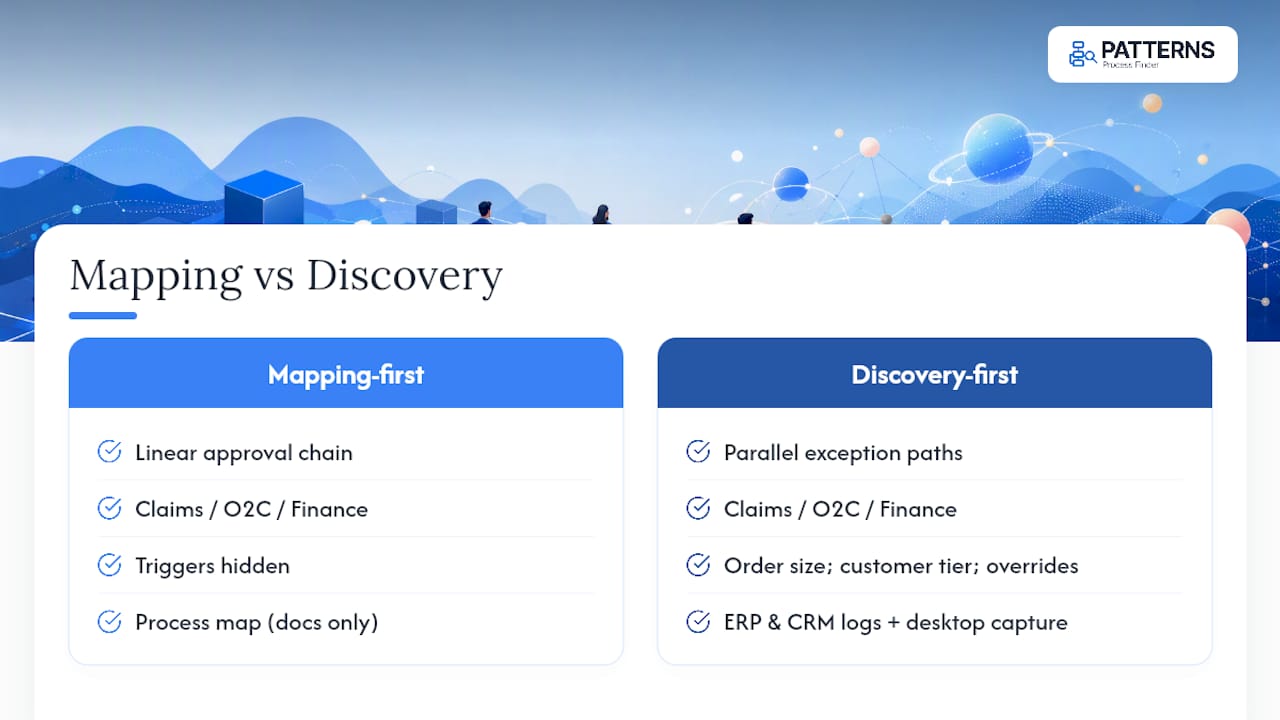
Teams that combined system-level process mining with desktop-level discovery got the fullest picture: mining showed the high-volume transaction patterns sitting in the ERP or CRM logs, while discovery captured the manual exception handling happening outside those systems. Signavio describes mining and discovery as complementary lenses for exactly this reason, one reading structured logs and the other reading human activity, and recommends running both when you need full visibility into a process, according to Signavio’s comparison of process discovery and process mining.
Teams running both consistently report fewer post-deployment fixes than teams that leaned on a single method. The pattern holds across functions: a process map tells you the shape of the work a customer or employee expects. Discovery tells you the shape the work actually takes, which is usually more crooked, and always more useful to a developer. A process mining tool built for business analysts can help surface that system-log layer alongside desktop capture rather than treating them as separate projects.
The pitfalls teams hit when picking a method
The most common mistake is treating the choice as permanent. A team picks mapping because it’s faster, ships an automation, and discovers the hard way that the map missed three exception paths that show up every month, not every year. The opposite mistake happens too: teams over-invest in full desktop discovery for a process so simple and low-volume that a two-hour workshop would have been enough, burning weeks of capture time on work that didn’t need it.
A second pitfall is confusing discovery with a one-time audit. Processes drift. Policy changes, new hires bring new habits, and system upgrades change which fields populate automatically. A discovery dataset from eighteen months ago is closer to a historical record than an operating spec.
A third: skipping the verification step with frontline staff after clustering variants. Automated clustering is good at grouping similar sequences, but it can’t always tell a genuine business exception from a personal workaround someone should stop doing. Teams that automate every clustered variant without that human check end up encoding bad habits into permanent bot logic.
Finally, undocumented processes tend to hide in the gaps between systems, the “swivel chair” moments where someone manually copies data from one tool to another. Neither a rushed map nor a shallow discovery pass tends to catch these reliably; they need deliberate attention regardless of which primary method a team chooses.
Who needs to be in the room for mapping versus discovery
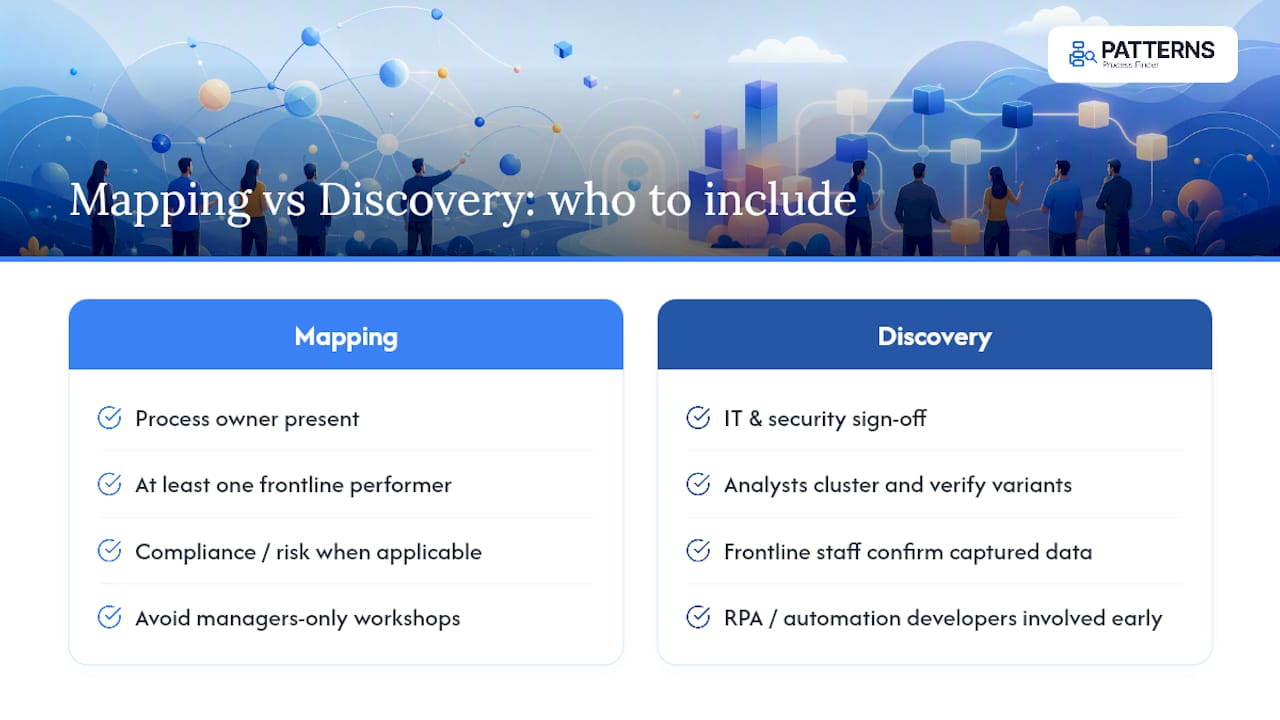
Process mapping is a workshop exercise, and it lives or dies on who’s in the room. You need the process owner, at least one frontline performer, and ideally someone from compliance or risk if the process touches either. Getting the wrong mix, managers only, no frontline staff, produces a map of the policy manual, not the job.
Discovery changes the collaboration model. The heaviest lift shifts from live workshop time to setup and interpretation: IT and security need to sign off on desktop capture scope and data handling before anything runs, and analysts need time afterward to cluster and verify variants rather than transcribe interview notes in real time. Frontline staff still matter, but their role moves from describing the process out loud to confirming what the data already shows, which tends to surface more honest detail because nobody’s performing for an interviewer.
RPA and automation developers should be looped in earlier with discovery than they typically are with mapping. Because discovery output translates directly into decision trees and step specs, developers can start shaping the automation architecture while variant clustering is still underway, instead of waiting for a finished flowchart to land on their desk. Transformation leads should treat re-discovery the same way they’d treat a recurring audit: scheduled, owned, and tied to a specific trigger like a system migration or a policy update, not left to happen only when something breaks.
Why the industry still defaults to mapping first
Most operations teams reach for a workshop before they reach for a discovery tool, and it’s not because mapping is more rigorous. It’s because it’s familiar, cheap to start, and produces a deliverable everyone can nod at in a meeting. That comfort is exactly the problem. A map gets treated as ground truth because it looks finished, when it’s really just the version of the process that survived a group conversation.
The honest position is that mapping earns its keep early, for scoping and getting a room of stakeholders pointed the same direction. Where the industry gets it wrong is stopping there and handing that map straight to a developer. Reality-based discovery isn’t a nice add-on for teams with extra budget. It’s the difference between designing for the process people describe and designing for the process people actually run, including the workaround they’d never mention out loud.
What’s underrated in most transformation programs is the second-order effect: once a team sees frequency-ranked variants for the first time, their whole definition of “the process” changes. Suddenly the exception isn’t an edge case anymore. That reframing alone prevents more automation failures than any amount of extra QA testing after launch.
— Malek
How Patterns Process Finder puts discovery-first into practice
Everything above points to one operational requirement: your automation and SOP work needs to run on evidence, not memory. That’s the specific gap Patterns Process Finder closes. Instead of a workshop producing a flowchart someone will argue about in a follow-up meeting, Patterns automates desktop-level capture across your team, surfaces hidden subprocess variations and client-specific rules that interviews miss, and turns that captured behaviour into living SOPs that update as the work changes.
The platform is designed with enterprise controls, privacy-conscious capture, and security features to support compliance teams in managing behavioural data, making it a great complement to Microsoft Fabric Consulting Services for analytics-led transformation. That matters most in the exact situations this guide flags as discovery-required: high-variance desktop work, repeated automation failures traced back to missed exceptions, or an early-stage transformation project that needs a real baseline before anyone commits engineering time.
If your team keeps rebuilding the same bot because the spec missed a branch nobody mapped, that’s the signal to stop guessing and start capturing. You can request a demo of Patterns Process Finder to see how desktop capture and variant analysis would apply to your own highest-risk process.
Sources
FAQ
What’s the core difference between a process map and reality-based process discovery?
A process map is built from interviews and workshops describing how work should happen. Reality-based discovery uses automated desktop capture to record how work actually happens, including hidden variants and exceptions.
Why does automating a process map often cause bots to fail?
Maps miss the branches, exceptions, and workarounds that interviews never surface, and bots built from that incomplete picture hit undocumented logic they weren’t designed to handle. Discovery data reveals those branches before code gets written.
Can process mapping and process discovery work together?
Yes. Mapping is useful for early scoping and stakeholder alignment, while discovery supplies the granular evidence developers need to build automation. Many teams also combine discovery with process mining on system logs for full end-to-end visibility.
How much data do you need before handing a process to automation developers?
Sample at least ten records across multiple people performing the task, cluster the variants by frequency, and verify the results with frontline staff before writing a developer spec. Skipping verification is one of the most common causes of automated bad habits.
Does Patterns Process Finder replace process mapping entirely?
No. Patterns Process Finder focuses on reality-based discovery, capturing actual desktop behaviour to build living SOPs and automation-ready specs, while mapping still has a role in early scoping conversations with stakeholders.