
Turn Everyday Work Into
Living Documentation
Automated documentation tool that captures how work actually happens and transforms it into accurate, up-to-date SOPs with no manual effort.
- Always up-to-date training & onboarding documentation
- Preserve institutional knowledge before employees leave
- Identify automation and RPA candidates
- Improve audit and compliance readiness
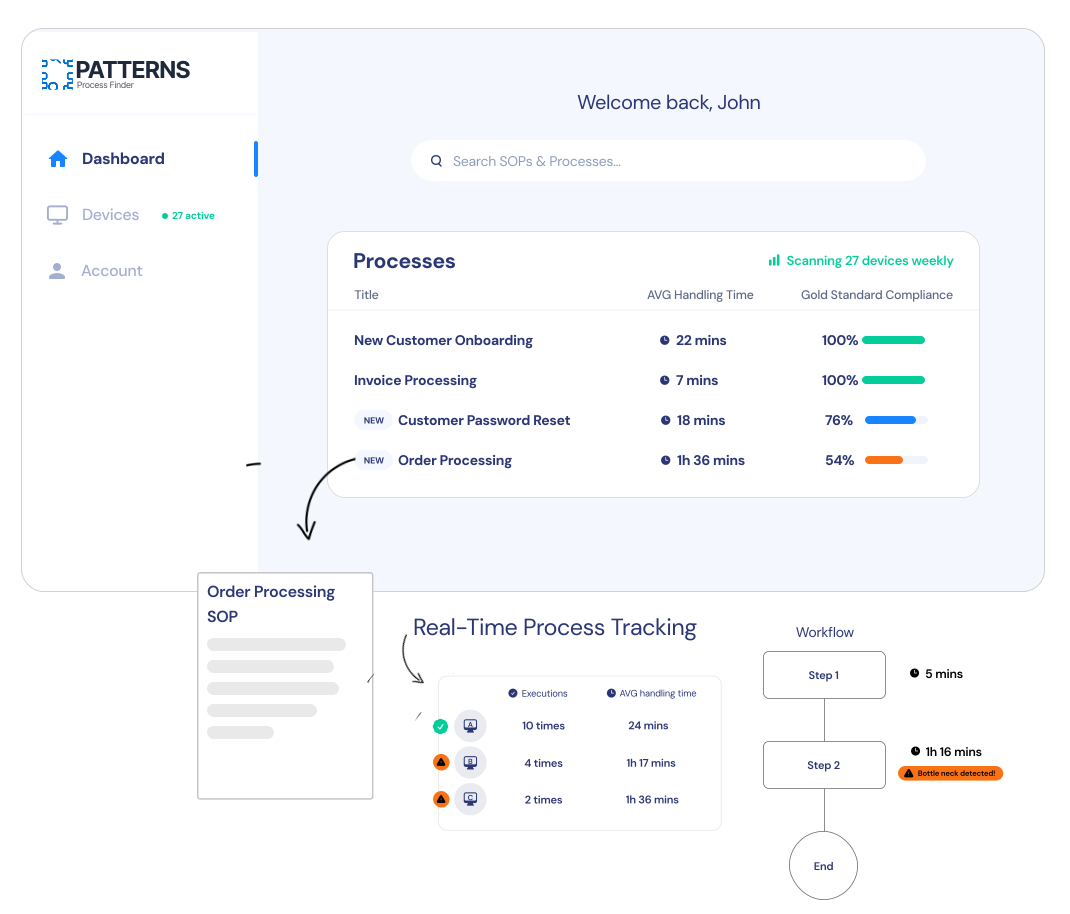
Designed for teams exploring modern alternatives to manual process documentation, workshops, and interviews.
Interactive Demo
See How Patterns Discovers Hidden Workflows and Process Variations
Patterns is an enterprise-grade workflow capture platform that automatically documents real operational processes — helping organizations replace manual SOPs with continuously updated, reality-based documentation.
Manual documentation doesn’t scale — and it never reflects reality
Most organizations still rely on interviews, shadowing, and workshops to document workflows. These methods are slow, subjective, and outdated the moment they're completed.

- SOPs that don't reflect real execution because processes evolve faster than documentation.
- Undocumented workflow variations create inconsistencies across teams.
- Weeks spent on discovery with incomplete results that don't reflect reality.
- Process knowledge lost when key employees leave because it was never properly documented.
As systems evolve and employees adapt, documented processes quietly drift away from reality — creating inefficiencies, compliance risk, and stalled automation initiatives.
Request a DemoWhat Are Automated Documentation Tools?
Automated documentation tools are software platforms designed to capture how work is actually performed and transform that activity into structured, up-to-date process documentation — without relying on manual input.
Unlike traditional documentation tools that depend on interviews or user-written instructions/recordings, automated documentation tools observe real user interactions (like clicks, keystrokes, etc) across systems to produce documentation that reflects reality, not intention.
In practice, automated documentation tools help organizations:
- Capture workflows as they occur
- Keep documentation & SOPs continuously updated
- Reduce reliance on institutional knowledge (held inside of employees' heads)
- Eliminate weeks of manual discovery work
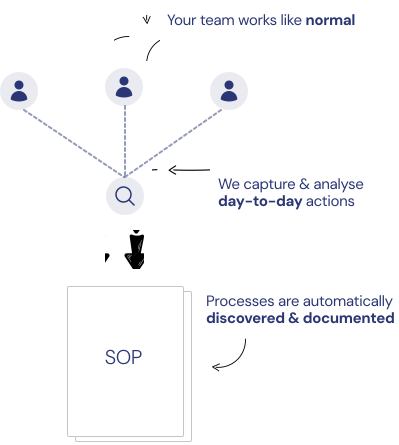
Record Work
Patterns securely & anonymously records user actions to understand how work happens across teams.
Document Processes Automatically
The system identifies repeated workflows and automatically builds SOPs based on your top performers in real-time.
Continuous Updates & Analytics
Every week, your documentation updates with latest policies and best practices with rich analytics to track adoption, compliance, and variations.
Why Traditional Documentation Tools Fail
Traditional documentation tools assume people can accurately describe how they work — and continuously update the documentation as the work, team, and systems evolve.
Traditional Documentation Tools
- ✕Work evolves daily, SOPs never reflect reality
- ✕Exceptions & variations become the norm, SOPs fail to capture them
- ✕Informal shortcuts outperform official processes
- ✕Employees rarely update documentation
- ✕New hires struggle to onboard without accurate documentation... leading them to slow down the rest of the team
Patterns Automated Documentation Tool
Passively captures real work performed by your team... transforms it into accurate, easy to read SOPs
Highlights exceptions, variations, and best practices
Live updates to your documentation as your workflows & systems evolve
Workflow Capture Software That Turns Reality into Documentation
Patterns is workflow capture software designed to passively observe real operational behavior and convert it into living, self-updating documentation.

How it works
Securely captures anonymized user actions across applications
Identifies repeatable workflows and variations
Highlights inefficiencies and undocumented steps
Generates continuously updated process documentation based on top performers
No interviews. No workshops. No manual rewriting.
Just reality-based, continuously updated documentation.
Request a DemoWhy Enterprises Use Workflow Capture Software
Organizations explore workflow capture software to understand how work truly flows across systems — not just how it's described on paper.
Accelerate Digital Transformation Initiatives
Understand current workflows before implementing new systems.
Identify Automation and RPA Candidates
Surface repetitive, manual tasks ready for automation.
Preserve Institutional Knowledge
Capture critical processes before key employees leave.
Reduce Onboarding and Training Time
New hires learn from living, continuously updated SOPs.
Improve Audit and Compliance Readiness
Documentation that reflects actual execution passes compliance reviews.
Enhance Process Improvement Efforts
Identify inefficiencies and bottlenecks with real workflow data.
Is Patterns Automated Documentation Tool Right for Your Team?
Not Designed For
- ✕One-off SOP generation
- ✕Static documentation libraries
- ✕Basic screen recording tools
A Good Fit For
- Operations and transformation teams
- Business analysts and RPA consultants
- Organizations struggling with outdated SOPs
- Teams seeking accurate process visibility
Built for Organizations Where Security Comes First
Enterprise-grade security with privacy-first architecture — choose the deployment model that fits how your organization handles data.
Privacy by Design
Fully anonymized data, encrypted at rest and in transit.
Confidential AI Processing
TLS 1.3 encryption at rest and in transit, whichever deployment model — Cloud or Enterprise — you choose.
SSO & Multi-Factor Auth
Enterprise SSO integration with MFA required for all admin accounts and granular access controls.
Zero Trust Network
Every connection authenticated—no implicit trust. Private network isolation available with Patterns Enterprise.
Complete Auditability
Full audit trails with timestamped access logs. Track who accessed what and when.
Compliance Ready
SOC 2, GDPR & ISO 27001 aligned architecture with data residency controls for regulatory requirements.
Data Minimization
Minimal retention policy. Only essential workflow data stored. You maintain full control and ownership.
Threat Monitoring
Real-time anomaly detection with instant admin alerts and defined incident response protocols.
Choose the Deployment That Fits Your Requirements
Whichever model you choose, Patterns is built around minimal data collection, clear boundaries on what's captured, and full transparency about how it's handled.
Learn More About Our Security & Data Privacy MeasuresFrequently Asked Questions
Common questions about automated documentation tools and workflow capture software
See Automated Workflow Capture in Action
Request a guided demo to see how automated documentation tools and workflow capture software work in practice.
What you'll get:
- Live walkthrough of workflow capture
- Example of generated documentation
- Security and deployment discussion
- Fit assessment for your organization