
Ops: Document 15–30 undocumented processes with 30 minute captures
Undocumented processes are the informal steps, exceptions, and tribal rules employees follow that never made it into any manual or workflow diagram. Left unmapped, they are the single biggest reason automation and AI agents fail once deployed. The fix starts now: run a discovery step, either an automated event-log check or a 30-minute capture interview, and convert what you find into machine-readable documentation before you build anything on top of it.
TL;DR:
- Automated discovery should be used first to identify high-volume processes, while manual interviews are essential for uncovering exceptions and off-system steps.
- Running three core fields—activity name, timestamp, and case identifier—must be validated with a sample to ensure accurate process discovery.
- Focus on documenting 15 to 30 critical processes that balance coverage of variations and exceptions before launching an automation pilot.
- Continuous updates and version tracking are necessary to keep documentation current and prevent drift from process changes.
- Relying on real case interviews, rather than assumptions or managerial recall, is key to creating reliable, automation-ready process documentation.
Table of Contents
- Why undocumented processes break automation and AI
- Discovery methods: automated, manual, and the hybrid approach
- A practical checklist for discovering undocumented processes
- Turning captured processes into machine-readable documentation
- Prioritizing which undocumented processes to document first
- Keeping documentation current once automation goes live
- What actually separates good discovery from theatre
- How Patterns Process Finder turns discovery into automation-ready SOPs
- Sources
- FAQ
Why undocumented processes break automation and AI
An AI agent cannot ask a colleague what to do when it hits a step nobody wrote down. It either skips that step or fills the gap with an assumption, and that assumption becomes an error the moment the process scales past one case. Research on automation failures in control environments shows this pattern repeatedly: agents misroute exceptions, apply defaults that don’t match the real rule, and produce outputs that look complete but are quietly wrong.
By the numbers: Roughly 70% of AI implementation failures trace back to process and people gaps rather than any shortcoming in the underlying model.
That statistic should reframe how operations leaders think about AI readiness. The model is rarely the problem. The documentation feeding it is.
Watch for two operational risk signals in particular: single-person dependencies, where only one employee knows how an exception gets handled, and excessive wait times, which usually mean an undocumented approval or handoff is hiding in the gap. Both are early warnings that a process will fail the moment you try to automate it.
Discovery methods: automated, manual, and the hybrid approach
Choosing how to find undocumented processes matters as much as choosing what to document. Two methods dominate, and each has a distinct blind spot.
Automated discovery pulls activity data directly from system event logs, sometimes called task mining or process mining. It gives you fast, evidence-based visibility into what actually happened across thousands of cases, and it builds a continuous audit trail because the data keeps flowing. What it cannot see is anything that happens off-system: a phone call, a sticky note, a judgment call an employee makes without touching a keyboard.

Manual capture closes that gap. A structured interview or a talk-aloud walkthrough surfaces the workarounds, exceptions, and informal rules that never generate a system record. It’s slower and doesn’t scale the way telemetry does, but it catches the human judgment that automated logs simply miss.
Comparisons of automated versus manual process mapping consistently recommend layering both rather than picking one. Automated discovery tells you where volume and variation live; manual capture tells you why the variation exists.
- Use automated discovery first when you need scale: high transaction volume, many process variants, or a baseline before deeper investigation.
- Use manual capture when exceptions, compliance judgment calls, or off-system steps are the likely failure point.
- Run both in parallel on high-risk processes rather than treating them as sequential stages.
Pro Tip: Don’t run one interview per process and call it done. Multiple practitioner sources find that talking to two or three people doing the same role surfaces different exceptions each time, because everyone’s “usual” case is slightly different.
The hybrid model isn’t just a compromise between speed and depth. It’s the only approach that gives you both the statistical picture (how often does this variant occur) and the narrative picture (why does it occur, and who decided that was acceptable).
A practical checklist for discovering undocumented processes
Before you commit to automated discovery or send anyone into an interview room, run these prechecks so the output is usable rather than noise.
Minimum event-log validation. Process discovery requires at minimum three fields: activity name, timestamp, and case identifier. Pull a sample of 100 rows from your export and check each field for consistency. Timestamps that jump time zones, case IDs that don’t match across two systems, or activity names logged inconsistently will corrupt your discovery model before it starts.
| Field | What to check | Common failure |
|---|---|---|
| Activity name | Consistent naming across systems | Same step logged under two labels |
| Timestamp | Correct time zone, no gaps | Batch jobs overwrite real event time |
| Case identifier | Matches across every touched system | Ticket ID differs from order ID |
Run the 30-minute capture interview. The 30-minute discovery interview method works in five phases:
- Trigger — ask what starts the process, exactly, not in general terms.
- Recent-case walkthrough — pick one specific case from last week and walk it step by step.
- Decision points — ask what determines each branch: a rule, a threshold, or a gut call.
- Exceptions — ask what happened the last time something went wrong.
- Handoffs — ask who receives the output and what they do with it.
The most common interview mistake is asking someone to describe the “usual” process. People default to the polished version they think they should be doing. Anchoring on one specific, recent case forces the real workaround into the open.
Before you start, confirm case identifiers actually match across every system the process touches, plan to record a transcript or screenshots for reference, and note any step that happens entirely off-system so it doesn’t vanish from the final documentation.
Turning captured processes into machine-readable documentation
A narrative capture, however detailed, isn’t automation-ready until it’s structured. Machine-readable documentation needs to define every decision condition explicitly, the inputs and outputs at each step, the exception handlers for known failure modes, the data sources involved, and the points where a human checkpoint is still required.
Three mapping approaches cover most cases:
- Decision trees for anything with branching logic based on clear thresholds or categories.
- Structured templates that force every step to list its trigger, inputs, outputs, and owner in the same format every time.
- API or system linkage notes that record exactly which system fields feed which decision, so an agent knows where to pull data from rather than guessing.
Pro Tip: After you build the first version, simulate five to ten real cases against it and log where the documented logic doesn’t match what actually happened. That mismatch rate tells you exactly which exceptions you missed, and it’s far cheaper to find in a simulation than in a production automation failure.
Refine the documentation until the mismatch rate drops toward zero on the cases you tested, then expand testing to less common variants before calling the process automation-ready.
Prioritizing which undocumented processes to document first
Not every undocumented process deserves equal attention on day one. Rank candidates against four criteria: automation ROI, failure risk (especially single-person dependencies and long wait times), transaction frequency, and regulatory or customer impact.
Sequencing matters more than most teams expect. Background guidance on AI deployment scope suggests aiming for 15 to 30 core processes documented before your first pilot goes live. That range gives enough coverage across common variations and exceptions to make the pilot a fair test, without stalling for months trying to document everything.
- Assign one owner per process to keep accountability clear during capture.
- Keep capture teams small, two or three people, so interviews stay focused and fast.
- Limit each capture session to a single recent case rather than trying to cover every variant at once.
- Start with the process that combines high volume and high risk, since that’s where automation failure costs the most.
Keeping documentation current once automation goes live
Documentation that goes stale is almost as dangerous as documentation that never existed. A process that changes after an interface update, a policy shift, or a new exception rule will silently drift out of sync with whatever automation was built against it.
Build continuous discovery into your operating rhythm rather than treating capture as a one-time project:
- Schedule re-captures on a fixed cadence for your highest-risk processes, not just when someone complains.
- Feed live telemetry from automated discovery tools into the same documentation so drift shows up automatically.
- Log every change with a version number, a timestamp, and a named owner responsible for sign-off.
Track three KPIs to know whether documentation is actually holding up: automation failure rate, exceptions per 1,000 cases, and time to update documentation after an interface change. A rising exception rate on a process you thought was stable is usually the first sign that reality has moved and the documentation hasn’t caught up.
What actually separates good discovery from theatre
Most process documentation projects fail for a boring reason: they document what the process owner thinks happens, not what happened in the last case that actually ran. That single distinction, real case versus remembered case, is the difference between documentation an AI agent can rely on and documentation that looks thorough on paper and breaks in production.
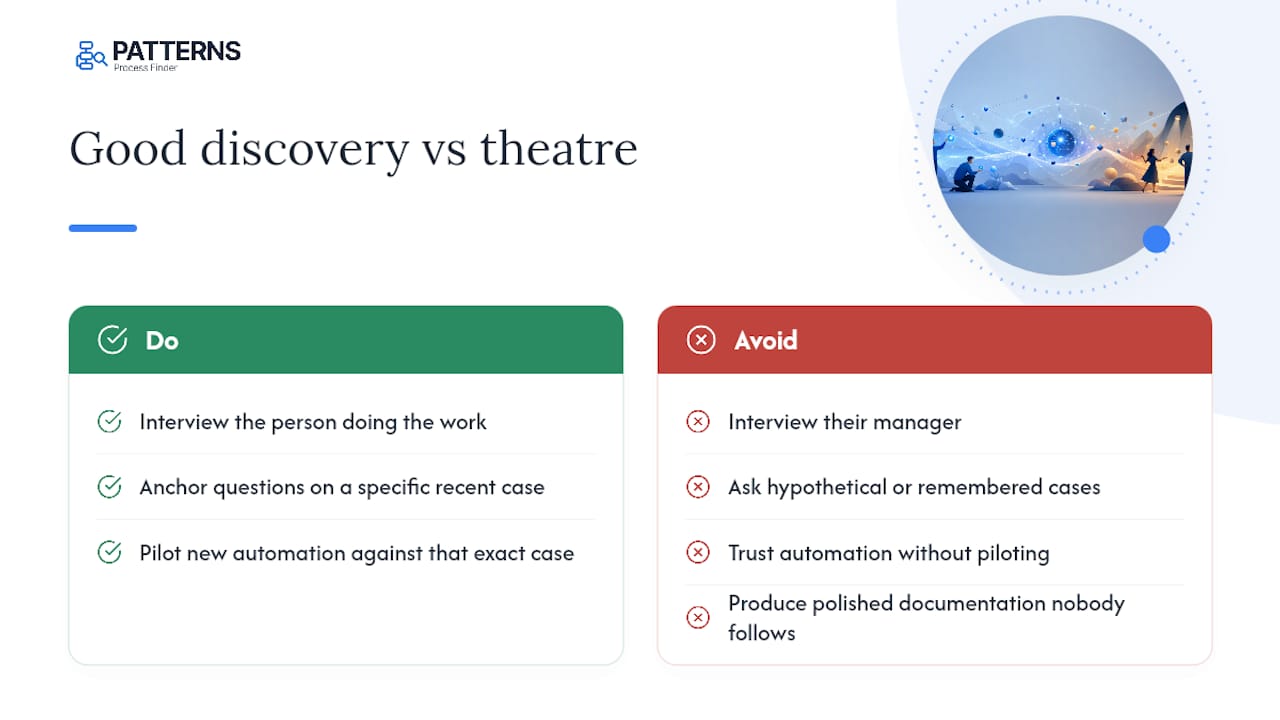
The conventional wisdom says more documentation is always better. It isn’t. Thirty polished pages describing a process nobody follows exactly is worse than five pages describing the three ways it actually branches, because the polished version gives automation teams false confidence. Patterns Process Finder was built around this exact gap: it automates discovery of real workflows as employees actually run them, surfaces the hidden subprocess variations and client-specific rules that interviews alone sometimes miss, and turns that evidence into documentation that stays tied to what’s genuinely happening on the ground.
If you take one habit from this article, make it this: interview the person doing the work, not their manager, anchor every question on a specific recent case, and pilot any new automation against that exact case before you trust it with a hundred more.
— Malek
How Patterns Process Finder turns discovery into automation-ready SOPs
Most teams lose weeks reconciling what an interview revealed against what the event logs actually show. Patterns Process Finder closes that gap directly by recording real user actions across desktop and browser applications, so the subprocess variations and exception rules your capture interviews surface get validated against genuine execution data instead of memory.
The platform’s automated process discovery builds the current-state view your first 15 to 30 core processes need, while its automated documentation workflow capture turns those captures into living SOPs that update as work actually changes, rather than sitting frozen the day someone signed off on them. For teams starting a pilot, the practical move is to pick one high-volume, high-risk process, run it through Patterns’ process mining tool, and measure the exception rate before and after. Request a demo to see how it maps to your own environment, or start a free trial and run it against a process you already suspect is undocumented.
Sources
- The hidden automation risk lurking in control environments
- How undocumented processes make AI agents unreliable
- Automated vs. manual process mapping: Which is right for you?
- Process discovery: definition, methods and use cases
FAQ
What counts as an undocumented process?
It’s any workflow, exception, or informal rule employees follow that isn’t recorded in a manual, SOP, or system diagram, including workarounds nobody thought to write down.
Why do undocumented processes cause AI agents to fail?
An agent either skips the undocumented step or fills the gap with an incorrect assumption, and that error compounds every time the process runs at scale.
Should I use automated discovery or manual interviews first?
Start with automated discovery for volume and pattern visibility, then run manual capture interviews on the exceptions and off-system steps the logs can’t show.
How many processes should I document before automating?
Aim for roughly 15 to 30 core processes to get reliable coverage across common variations and exceptions before your first automation pilot goes live.
What’s the minimum data needed to run automated process discovery?
At minimum you need three event-log fields: activity name, timestamp, and case identifier, validated on a sample before running full discovery.
How does Patterns Process Finder help with undocumented processes?
Patterns automates discovery of real workflows as employees execute them, capturing hidden subprocess variations and turning them into continuously updated SOPs built for automation pipelines.