
Client-specific business rules: what they are and why they break automation
Client specific business rules are the empirically observed subprocess rules and exception patterns that actually govern how work gets done inside your organization, not the rules written in your SOP binder. They live in the gap between documented process and executed process, and that gap is what causes most automation and RPA projects to stall after launch.
If you’re planning an automation rollout, the one thing to do now is stop treating your process documentation as ground truth. Verify it against real behaviour first.
- Client’s definition: informal, observed exceptions and workarounds specific to how one organization actually runs a process
- Automation implication: every undocumented rule you miss becomes a failure point once a bot or agent hits it in production
- Relevant reference points: SOC 2 logging practices for auditable capture, and discovery tools such as Patterns Process Finder
Key Takeaways
Automation succeeds when teams discover client-specific rules through direct observation, validate them against real outcomes, and govern them with clear ownership and audit trails.
| Point | Details |
|---|---|
| Definition matters first | Client-specific business rules are observed exceptions, not documented policy, and must be treated that way. |
| Combine discovery methods | Task mining, process mining, and frontline interviews each catch different rules; use all three. |
| Validate before automating | Test extracted rules against holdout data, targeting the 70 to 85 percent predictability range vendors report. |
| Governance prevents drift | Named owners, audit trails, and SOC 2 aligned logging keep rules current after launch. |
| Patterns Process Finder maps reality | It captures real workflow execution and hidden rules continuously, turning them into living SOPs for automation teams. |
Table of Contents
- What client-specific business rules look like and where they hide
- Why undiscovered rules sabotage automation, RPA and AI projects
- How to discover client-specific rules: methods, trade-offs, and sequencing
- How to codify, test, and govern the rules you find
- A 6-step pilot playbook you can run in 4 to 8 weeks
- What teams usually miss, and a warning worth heeding
- How Patterns Process Finder finds the rules your SOPs missed
- Curated readings and Patterns resources
- Sources
- FAQ
What client-specific business rules look like and where they hide
These rules rarely show up in a flowchart. They live in three places, and each one requires a different discovery approach.
People-based rules are the workarounds a specific employee developed and never wrote down. A claims processor might auto-escalate any file over $10,000 for a particular carrier, a rule nobody codified because it “just makes sense” to the person doing it.

Technical hiding places include stored procedures, configuration files, database triggers, and admin override screens. Research on legacy codebases identifies seven common hiding places for business rules, and stored logic often outlives the people who wrote it.
Time-based and situational rules shift with context: end-of-quarter processing might skip a validation step to hit close deadlines, or legacy customers might get grandfathered pricing exceptions that never made it into the CRM.
- Operator memory: an unwritten escalation threshold
- Config files: a discount rule buried in a pricing engine
- Quarter-end exceptions: compressed approval chains under deadline pressure
Pro Tip: Ask frontline staff “what do you do when the system won’t let you do the normal thing?” That question surfaces more hidden rules than any workshop about the “ideal” process.
Why undiscovered rules sabotage automation, RPA and AI projects
Every business rule your team fails to catch becomes an exception the bot cannot handle. That translates directly into cycle time, error rate, and automation pass rate, the three metrics operations leaders actually get measured on.
Academic work on this problem calls it the “Logic Gap,” the discrepancy between documented intentions and what actually happens on the ground. Researchers behind the ExIde framework found that condition-dependent, nested logic is precisely what standard process documentation fails to capture, and it’s the hardest part of automating any real workflow.
The pattern: vendor case studies describe workflow rule mining projects that validate extracted rules against holdout data before deployment, targeting 70 to 85 percent predictability in reported cases. Anything below that threshold usually means hidden rules are still uncaptured.
- Exception volume spikes when bots hit undocumented conditions
- Rework and manual override rates climb post-launch
- Trust in the automation erodes fast once staff start bypassing it
How to discover client-specific rules: methods, trade-offs, and sequencing
No single method finds everything. The right approach blends four discovery layers, each catching what the others miss.
- Task mining captures desktop-level activity: clicks, keystrokes, app switches. It reveals execution-level variance invisible to system logs, though it raises privacy questions that demand clear consent and scoping upfront.
- Process mining analyzes event logs from your existing systems, giving you system-wide coverage of how cases actually flow. Its blind spot is anything that happens outside logged systems, spreadsheets, phone calls, sticky notes.
- Human discovery through structured interviews and shadowing sessions surfaces tacit knowledge no system captures. Practitioner guidance consistently finds that recording and interviewing frontline operators before remapping a process produces the most reliable discoveries.
- Code and config inspection turns up rules buried in stored procedures, triggers, and admin tools, the kind that survive multiple system migrations without anyone questioning them.
Comparative analysis of these methods notes that task mining and process mining are complementary, not competing, layers of the same picture. Combining desktop and system data produces what one industry primer calls process intelligence, a single actionable view rather than two partial ones.
| Discovery phase | Timeframe | Primary output |
|---|---|---|
| Quick wins scan | Weeks 1 to 2 | Top 5 to 10 obvious exceptions from staff interviews |
| Pilot capture | Weeks 3 to 5 | Task mining data from one team, one process |
| Deep rule extraction | Weeks 6 to 8 | Validated rules ledger with holdout testing |
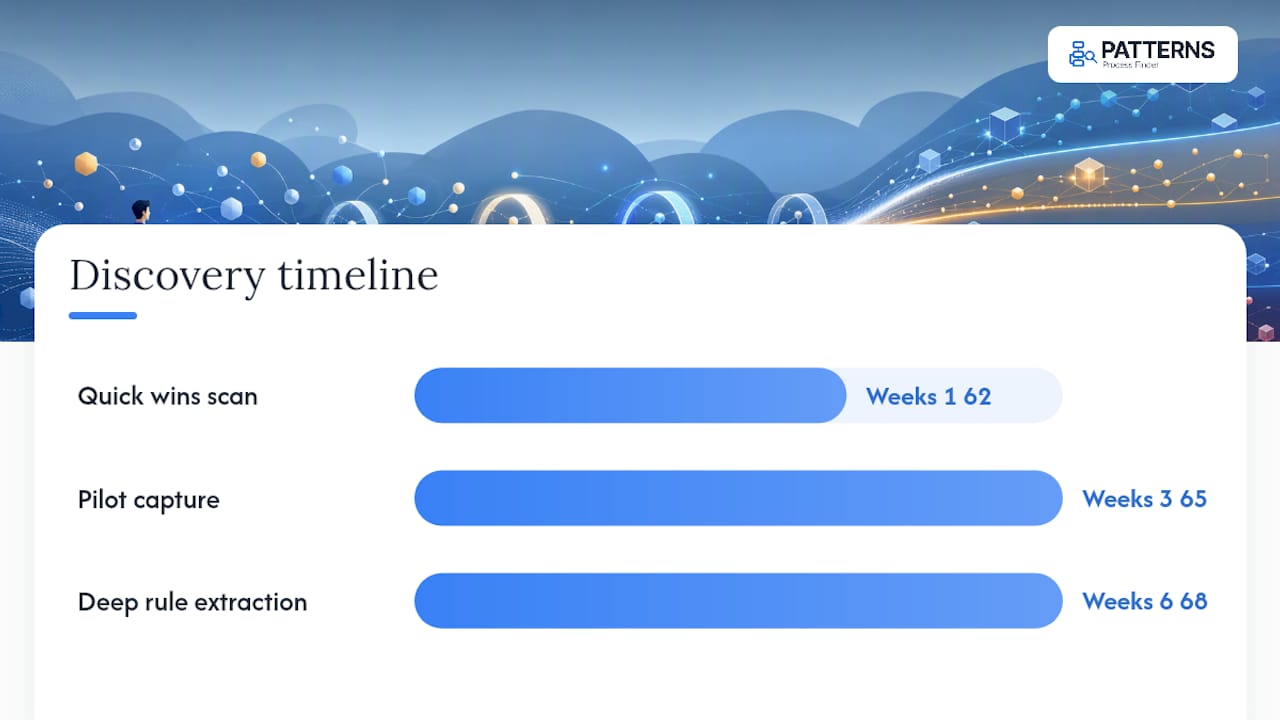
Start with quick wins to build stakeholder trust, run the pilot to gather real evidence, then move into full extraction once you know the pattern is worth scaling.
How to codify, test, and govern the rules you find
Discovery only has value if the rules end up somewhere usable. That means converting scattered findings into structured rule flows or living SOPs that update as the process changes, not static documents that go stale in six months.
Testing matters as much as capture. Holdout validation, checking extracted rules against transactions the model never saw, catches false patterns before they hit production. Staged rollouts let you watch a small volume of cases first, and simulation environments let you stress-test edge cases without customer risk.
Governance closes the loop:
- Assign a named owner for every codified rule, not a department
- Maintain an audit trail of who changed what rule and when
- Apply change control before any rule modification goes live
- Log activity in line with SOC 2 Type II standards so audits don’t become archaeology projects
Pro Tip: Design for hybrid automation from day one. Let the system handle the 80 percent of cases that follow standard logic, and route the rest to a human queue with the exception context attached, not a blank ticket.
A 6-step pilot playbook you can run in 4 to 8 weeks
- Pick one pilot process with clear volume and a single measurable success metric, and get sign-off from the team that owns it.
- Capture evidence through screen recordings, system logs, and structured interviews with the people doing the actual work.
- Build a rules ledger that lists each candidate rule, its trigger condition, and where it currently lives (a person’s habit, a config file, a spreadsheet).
- Validate rules against holdout data, ideally comparing top-performing operators against average ones to isolate the logic that actually drives outcomes.
- Codify validated rules into living SOPs using tools like visual process mapping, then run staged automation tests.
- Assign owners and monitoring so rule drift gets caught early, with a feedback loop back to the frontline team.
| Step | Owner | Output |
|---|---|---|
| Pilot selection | Ops lead | Scoped process and success metric |
| Evidence capture | Analyst | Recordings, logs, interview notes |
| Rules ledger | Analyst | Documented candidate rules |
| Validation | RPA developer | Holdout-tested rule set |
| Codification | Transformation team | Live SOPs, staged tests |
| Governance | Named owner | Monitoring and change log |
What teams usually miss, and a warning worth heeding
Most transformation teams interview managers and skip the people actually doing the work. That’s backwards. Managers describe the process they think exists; operators execute the one that actually works, exceptions included.
One pattern shows up repeatedly: a team automates the “clean” version of a process, launches, and watches exception volume flood a queue nobody staffed for. The rules weren’t hidden. Nobody asked the person who knew them.
How Patterns Process Finder finds the rules your SOPs missed
Patterns Process Finder exists for exactly this problem: capturing how employees actually execute work across desktop and browser applications, then surfacing the subprocess variations and client-specific rules that traditional documentation never records. Instead of interviewing your way toward a guess, you get a reality-based map of the process, continuously updated as work changes.
The platform pairs automated process discovery with enterprise-grade logging built around SOC 2 Type II audit requirements, so the behaviour capture that fuels your rules ledger is also defensible to your compliance team. That combination, discovery plus auditability, is what most task-mining tools skip. If your last automation project stalled on undocumented exceptions, start a free trial of the process mining tool and see what your teams are actually doing today.
Curated readings and Patterns resources
- ExIde: structure-aware business rule flow modelling (ACL 2026)
- Workflow rule mining (WithPraxis)
- Turn work into living SOPs
Sources
- ExIde: structure-aware business rule flow modelling (ACL 2026)
- Workflow rule mining: converting tacit expertise into executable AI logic (WithPraxis)
FAQ
What Are Client-Specific Business Rules?
They’re the informal, observed exceptions and workarounds that govern how a specific organization actually executes a process, distinct from what its official SOP documents describe.
Why Do These Rules Cause Automation Failures?
Undocumented rules become exceptions a bot can’t handle, driving up error rates and cycle time until manual overrides pile up and staff stop trusting the automation.
Which Discovery Method Finds the Most Hidden Rules?
No single method covers everything; combining task mining, process mining, and frontline interviews catches the technical, systemic, and tacit rules that any one method alone would miss.
How Long Does a Rule Discovery Project Take?
A focused pilot typically runs 4 to 8 weeks, moving from quick-win interviews through pilot capture to validated rule extraction with holdout testing.
Can Patterns Process Finder Help Discover These Rules?
Yes. Patterns Process Finder captures real workflow execution across desktop and browser applications, surfacing hidden subprocess rules and turning them into continuously updated SOPs.