
Prevent Bot Failures: 7 Step Automatic Process Mapping Pilot for Ops
Automatic process mapping uses automated discovery methods and AI to capture how work actually happens across systems, rather than how a manual sat down and described it three years ago. It produces faster, more accurate maps than workshop mapping, and it surfaces hidden variants and automation candidates that manual documentation routinely misses. The distinction that matters next is how it works, and which method fits your data.
TL;DR:
- Automated process discovery provides continuous updates, capturing real work variations across multiple applications, unlike static workshop maps that quickly become outdated.
- Process mining extracts process flows from structured event logs in systems like SAP or Salesforce, excelling at high-volume, single-system process analysis.
- Process discovery uses desktop probes or AI to observe user actions directly, revealing subprocesses and exceptions that log-based mining often misses.
- Combining process mining and discovery offers a comprehensive view, with mining establishing a statistical baseline and discovery identifying cross-application handoffs and informal steps.
- Selecting the right tool depends on process complexity, data availability, and the need for dynamic updates, especially for cross-application workflows and compliance-critical processes.
Table of Contents
- What is automatic process mapping?
- How automatic process mapping works: methods, data and outputs
- Why does automated process mapping actually save money?
- Process mining vs process discovery: which do you need?
- Where automated mapping delivers the most value
- How to run your first automated mapping pilot
- What should you check before choosing a mapping tool?
- Patterns in practice: living SOPs that keep up with real work
- What operations leaders keep getting backwards
- Get your process discovery pilot moving
- Sources
- FAQ
What is automatic process mapping?
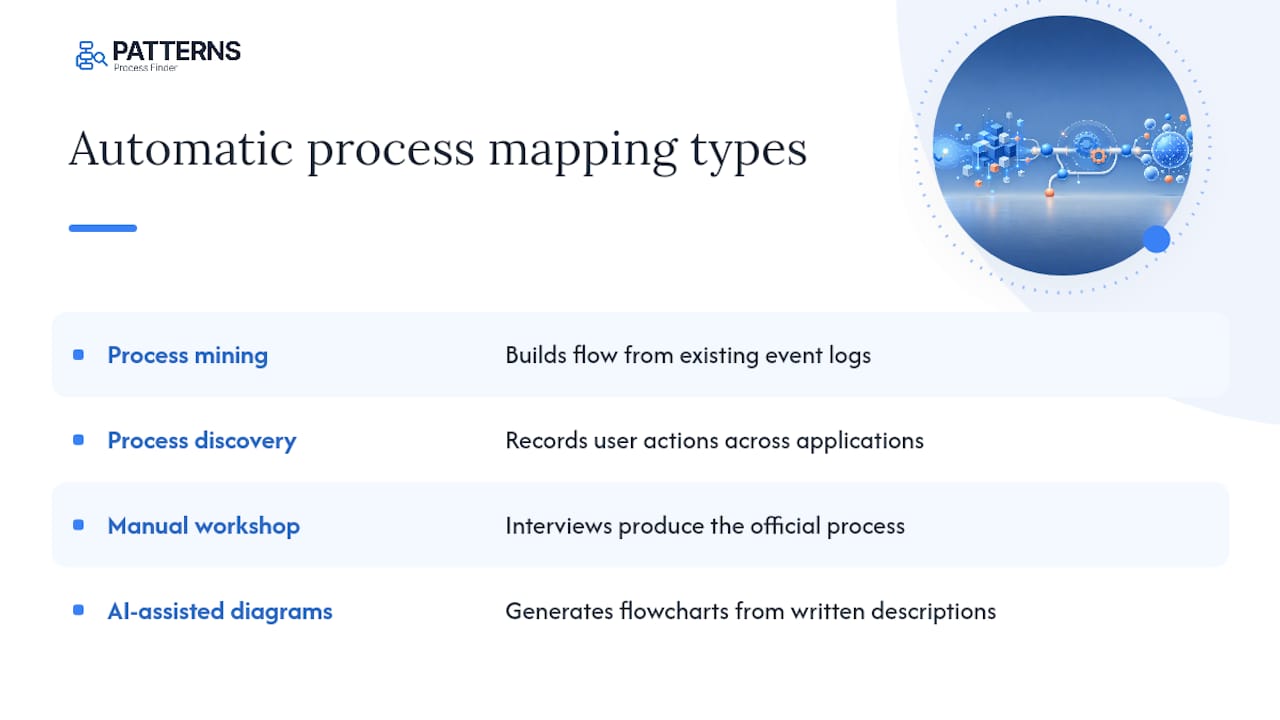
Automatic process mapping is the general term for any technique that builds a workflow visual from real system or user data instead of a facilitator’s whiteboard session. Under that umbrella sit two distinct techniques that people constantly conflate: process mining and process discovery.
Process mining reconstructs a workflow from event logs already sitting inside your ERP, CRM, or ticketing system. It is a statistical exercise: timestamps in, a flowchart out. Process discovery works differently. It captures user interactions directly, through desktop probes or lightweight agents, and builds what amounts to a digital twin of the work itself, without needing existing event logs or deep system integrations, according to a comparison from TDWI. That matters when a process lives across five applications, two spreadsheets, and an inbox, because none of those generate a clean log to mine.
Then there is manual workshop mapping, where a business analyst interviews stakeholders and draws the process as people describe it. This method is cheap to start and useful for building shared understanding early on, but it captures the official version of a process, not the version with the three exception handling steps nobody mentions because they assume everyone already knows about them.
AI-assisted diagram generation is a fourth, often-confused category. Tools like Microsoft Visio now let you generate a flowchart from a written description or structured input, which speeds up the drawing step but does nothing to verify that the description is accurate according to Visio’s own product documentation. It is a documentation accelerator, not a discovery method.
Here’s the practical rule: if you need speed of drawing, AI-assisted diagramming works. If you need statistical truth about a logged process, use process mining. If you need to see what people actually do at their desks across applications that don’t share a clean log, use process discovery. Most organizations end up needing more than one.
How automatic process mapping works: methods, data and outputs
Log-based process mining pulls structured event data, timestamps, case IDs, activity names, from systems like SAP, Salesforce, or a ticketing platform, then reconstructs the sequence of steps statistically. It needs clean, structured logs and system access, and it shines on high-volume, single-system processes: invoice processing, claims intake, order fulfillment. What it cannot see is anything that happens outside the logged system, a phone call, a manual override in a spreadsheet, an email approval.
Process discovery takes the opposite starting point. Instead of reading logs, it observes the work directly, through desktop probes, lightweight agents, or computer vision that watches screen activity and mouse and keyboard patterns. This approach builds a digital twin of the actual work without requiring event logs at all, which is precisely why it uncovers subprocesses that log-based mining misses entirely, per TDWI’s comparison.
Hybrid approaches combine both. Event logs establish the statistical backbone, telemetry and desktop capture fill in the human-system gaps, and document NLP extracts steps buried in policy PDFs, emails, or ticket notes. Some deployments add sensor data for physical workflows, though that remains a minority use case outside manufacturing and logistics.
Outputs vary by intended use. A swimlane diagram works well for early discovery and stakeholder communication, because it shows who does what without demanding technical precision. BPMN (Business Process Model and Notation) becomes necessary once a map is destined to feed an automation pipeline, since it is the standard notation for executable process models maintained by the Object Management Group. Basic flowcharts sit in between: readable, quick to produce, but not rigorous enough for direct handoff to RPA developers.
Update cadence is where automated methods separate themselves most clearly from manual mapping. A workshop-built map is a snapshot, accurate the day it was drawn and gradually wrong after that. Automated discovery can refresh continuously or near continuously as the underlying system or user behaviour changes, which is a meaningfully different proposition for teams that need current documentation, not historical documentation, according to an explainer on how AI process mapping works.
Why does automated process mapping actually save money?
Speed is the most visible gain, but it is not the most valuable one. A manual mapping workshop for a moderately complex process can take weeks: scheduling interviews, reconciling conflicting descriptions, redrawing after every correction. Automated discovery compresses that timeline substantially by building the initial map directly from observed data rather than recollection.
Accuracy is the deeper payoff. Interviewed employees describe the process they were trained on, not the one they actually run, especially once workarounds, informal exceptions, and client-specific rules have accumulated. Automated discovery surfaces those variants because it observes what happens rather than what people report happened. That distinction is exactly why automation failure rates run high in the first place: an RPA bot built against the official process breaks the first time it hits an exception nobody documented.
ROI shows up in three places. Cycle time improves once bottlenecks are visible instead of assumed. Rework reduction comes from catching automation candidates before they’re built against the wrong version of the process, rather than after a bot fails in production. Audit and compliance costs drop because a continuously updated map reflects current practice, instead of a static document that was accurate two reorganizations ago.
The caveat worth stating plainly: none of this happens automatically just because a tool is running. Discovery output still needs SME validation, and ROI depends heavily on choosing a process with enough volume and enough variance to justify the investment. A process run twice a month by one person is rarely worth automated discovery, no matter how appealing the tooling looks.
Process mining vs process discovery: which do you need?
The decision comes down to what data you have and what you are trying to see.
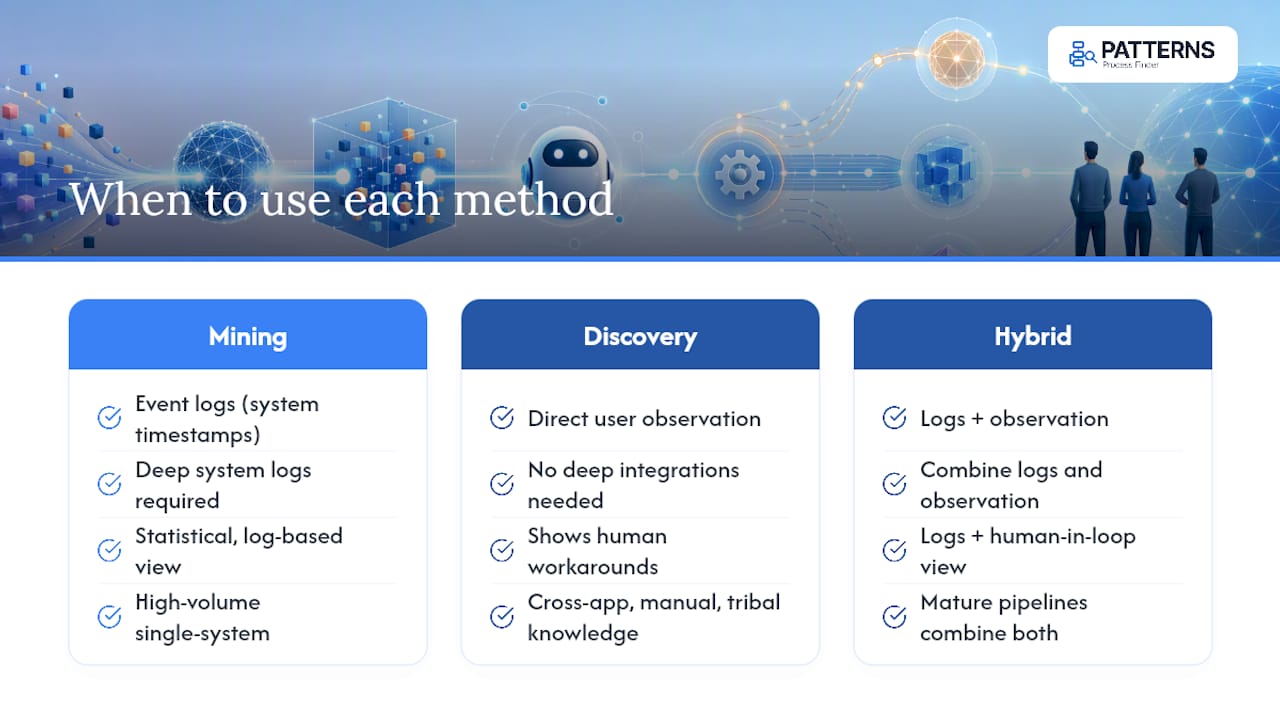
Process mining needs event logs: structured, timestamped records already generated by a system of record. If your process lives entirely inside SAP or Salesforce and the system logs every step, mining gives you statistically reliable analytics with relatively little setup, according to Automation Anywhere’s comparison of the two techniques. It is the right first move for high-volume, single-system, log-rich processes.
Process discovery needs neither logs nor deep integrations. It requires the ability to observe user interactions directly, which makes it the right tool when the process spans multiple applications, includes manual steps like spreadsheet edits or email approvals, or depends on tribal knowledge that has never been written down. Mining answers “what does the log say happened.” Discovery answers “what did the person actually do, including the workaround they never mentioned in the requirements meeting.”
The two are not competitors. A mature automation pipeline typically uses mining to establish the statistical baseline for logged systems, then layers discovery on top to catch the white space, the handoffs, exceptions, and cross-application steps that no log will ever record. Automation Anywhere frames this explicitly as complementary rather than either/or: mining for log-based statistical truth, discovery for human-in-the-loop visibility into automation readiness.
Where automated mapping delivers the most value
Not every process justifies the investment. Automated mapping earns its keep fastest in three situations.
High-volume, repeatable processes like order-to-cash, claims intake, or accounts payable generate enough transaction volume that even small cycle-time gains compound quickly. These processes also tend to run inside systems that produce clean logs, making them natural candidates for mining, discovery, or both.
Cross-application, multi-actor workflows are where discovery specifically outperforms log-only mining. A customer onboarding process that touches a CRM, an email client, a document signing tool, and a spreadsheet has no single log that captures the whole journey. Only direct observation across those applications reveals the true handoff pattern, including the informal fixes people apply when a system doesn’t talk to another one properly.
Pre-automation discovery for RPA and compliance-sensitive processes is arguably the highest-stakes use case. Building a bot against an assumed process, rather than the observed one, is the single biggest driver of automation failure. Compliance-heavy processes carry the same risk in the other direction: an auditor asking “show me how this actually runs” gets a much better answer from a continuously updated map than from a policy document nobody has touched since the last audit.
How to run your first automated mapping pilot
A pilot succeeds or fails based on scope discipline, not tooling sophistication. Follow a sequence, not a wish list.
- Pick one process with enough volume to matter. Choose something run dozens of times a week minimum, with a visible pain point, long cycle time, frequent errors, or high manual effort, so the results are undeniable.
- Set success metrics before you start. Decide in advance whether you’re measuring cycle time reduction, error rate, or automation readiness, so the pilot has a clear pass or fail line.
- Choose your data collection approach. Use log-based mining if the process lives inside one well-instrumented system; use desktop capture or discovery if it spans multiple applications or includes manual steps.
- Handle consent and privacy up front. Tell affected employees what is being captured and why, and follow guidance from a body like the Cybersecurity and Infrastructure Security Agency when deploying any telemetry-collecting agent.
- Run discovery, then validate with SMEs. The raw output is never the final map; a short workshop with the people who do the work catches misreads and confirms which variants are genuine exceptions versus noise.
- Produce an as-is map and a friction inventory. Document the current state exactly as observed, and list every bottleneck, rework loop, and workaround separately so nothing gets lost in the diagram itself.
- Prioritise automation candidates and measure against your baseline. Score candidates using volume, variability, and rule clarity, similar to the approach outlined in this scoring framework for deciding when to automate, then track the metrics you set in step two.
What should you check before choosing a mapping tool?
Vendor demos tend to show the best-case scenario. The questions below cut through that.
- Data coverage: does it work from logs, desktop capture, or both, and does that match the systems your target process actually touches?
- Continuous updates: does the map refresh automatically as work changes, or does it require a manual re-run every time?
- Security and privacy controls: where is data stored, how is personally identifiable information handled, and does the vendor follow recognized guidance such as CISA’s on telemetry collection?
- Notation and export support: can it output swimlane diagrams for stakeholder review and BPMN for automation handoff, without a separate redrawing step?
- Analytics and prioritisation: does it surface bottlenecks and variant frequency, or just draw a picture?
- Deployment effort: how much IT involvement does rollout require, and who owns the tool day to day, operations, or automation engineering?
- RPA handoff: does the output map cleanly to what your automation developers need, or does it require manual translation before a bot can be built?
Patterns in practice: living SOPs that keep up with real work
Documentation goes stale the moment the process changes and nobody updates the diagram. Patterns Process Finder addresses that gap directly by automating discovery of how employees actually execute work across desktop and browser applications, then generating living SOPs that update as the underlying process shifts.
The practical value shows up in the hidden subprocess variations it surfaces, the client-specific rules and exception handling that never made it into the official procedure. Those undocumented branches are frequently the exact reason an automation build fails in production months after go-live.
Pro Tip: Before scoping any automation project, ask whether the process map you’re working from was drawn from a workshop or captured from real usage. If it’s the former, budget time for the exceptions you haven’t found yet.
What operations leaders keep getting backwards
Map before you automate. That sounds obvious until you watch a team build a bot against the process description in a training manual, then spend three times the original build effort patching it against exceptions discovered one at a time in production.
Hybrid discovery earns its complexity for cross-application work specifically. If your process lives in one system, log mining alone is often enough. The moment it spans a CRM, an inbox, and a spreadsheet, skipping direct observation is how automation failure rates climb.
Scope creep kills more pilots than bad data does. Pick one process, validate the map with the people who run it, and resist the urge to map the entire department because the tool makes it look easy.
— Malek
Get your process discovery pilot moving
The methods above only pay off once someone actually runs the pilot, and that’s where most teams stall out picking between competing frameworks instead of just capturing real data. Automated process discovery tools give operations and automation teams a faster starting point: they automate discovery of how work actually happens across desktop and browser applications, then turn that observation into living SOPs that update as the process changes, rather than documents that age out within months.
That matters most for the exact situations flagged earlier, cross-application handoffs, client-specific exceptions, and pre-automation discovery where an inaccurate map leads directly to a failed bot build. Patterns identifies those hidden subprocess variations before they turn into rework, which is the single biggest lever for reducing automation failure rates. If a SAP-centric process is your first candidate, the SAP process discovery pilot is built to produce a validated map inside two to four weeks. Otherwise, request a demo and bring one real process to walk through, or check pricing to see which plan fits your team’s scope.
Sources
- Process Mining Versus Process Discovery: An In-Depth Comparison | TDWI
- Microsoft Visio flowchart software | Microsoft
- Cybersecurity and Infrastructure Security Agency (CISA)
- Difference Between Process Mining and Process Discovery | Automation Anywhere
FAQ
What Are the Top Process Mapping Tools?
There is no single “top 10” that fits every organization: the right set depends on whether you need log-based mining, desktop capture discovery, or general diagramming. Automated discovery platforms like Patterns Process Finder, diagramming tools like Microsoft Visio, and collaborative whiteboard tools each solve a different piece of the mapping problem.
What Is an Example of Process Mapping?
A common example is mapping an invoice-to-payment cycle: capturing every step from invoice receipt through approval, matching, and payment release, including exception paths like disputed invoices or manual overrides that a purely logged system would miss.
Which BPM Tool Is Best for Ongoing Documentation?
The best choice depends on whether you need static documentation or continuously updated maps; tools built for automated discovery, rather than one-time diagramming, are better suited to processes that change frequently or involve multiple applications.
Does Microsoft Have a Process Mapping Tool?
Yes. Microsoft Visio provides flowcharting and diagramming features, including AI-assisted diagram generation from structured input, though it documents processes rather than discovering them from real usage data.
How Is Process Discovery Different From Process Mining?
Process mining analyzes existing event logs statistically, while process discovery captures user interactions directly to build a digital twin of actual work, without needing logs or deep system integrations.