
Recording user actions to map real workflows, not assumed ones
Recording user actions, in an enterprise process discovery context, means capturing real employee workflows across desktop and web applications to build process maps, generate living SOPs, and surface automation candidates. It is not screen capture for training videos or a browser testing recorder. If you’re evaluating this for your organization, the verdict is simple: run a controlled pilot with a small group of representative users, enable screenshots and annotations, and feed the resulting logs into a discovery pipeline modelled on the RPM (Robotic Process Mining) stages. Tools like Patterns Process Finder build on that pipeline directly.
- Capture across desktop, browser, and office applications, not just one channel
- Pair every event with a screenshot for context
- Run logs through event abstraction before you attempt process discovery
Statistic Callout: Research prototypes like SmartRPA extend the RPM pipeline into five operational steps and can generate executable RPA scripts directly from observed UI logs when variant detection is robust enough.
Key Takeaways
Reality-based process discovery works because it replaces assumed workflows with recorded ones, feeding actual employee behaviour through an abstraction and mining pipeline to produce SOPs and automation candidates that match how work truly happens.
| Point | Details |
|---|---|
| Start with a controlled pilot | Record 5 to 10 representative users over 2 to 4 weeks before committing to enterprise rollout. |
| Prioritize element-aware capture | Coordinate-based logging breaks across machines and screen resolutions, limiting portability. |
| Pair events with screenshots | Annotated screenshots reveal exception handling and reasoning that raw event logs miss entirely. |
| Budget for analyst validation | Recorders can misread pauses as baseline behaviour unless a human reviews and tags exceptions. |
| Choose a tool built for governance | Patterns Process Finder combines automated recording, screenshots, variant detection, and living SOP generation in one pipeline. |
Table of Contents
- How does recording user actions actually work?
- What outputs should you expect from a recording pilot?
- How long does a recording pilot take, and what does it cost?
- What privacy and security controls does user action recording require?
- What should you look for in a recording tool?
- Turning recordings into a working automation pipeline
- Sources
- FAQ
How does recording user actions actually work?
The pipeline behind reality-based process discovery runs through five distinct stages, each with its own failure modes and technical demands.
- Log recording. System, office, and browser loggers run in parallel, watching for keystrokes, mouse events, Excel cell edits, application switches, and page navigation. This is the raw capture layer.
- Log processing. Raw events get organized into structured event logs, typically CSV or similar formats, timestamped and tagged by application and user session.
- Event abstraction. Low-level events (a mouse click at coordinates 412,88) get mapped to high-level actions (opened invoice record). This step is where most of the analytical value gets created or lost.
- Process discovery. Abstracted events feed into a discovery engine, commonly a heuristic miner such as the one implemented in PM4PY, producing a directly-follows graph (DFG) that shows how work actually flows.
- Script generation. Once variants and exceptions are understood, the same logs can generate automation candidates or actual RPA scripts.
Coordinate-based capture, the simplest approach, records where a click landed on screen. It’s fast to implement but fragile: it cannot reliably replicate behaviour across different machines or resolutions. Element-aware logging (tracking the underlying UI object rather than pixel coordinates) is more portable but requires deeper integration work.
Statistic Callout: Pairing each event with a screenshot and allowing analysts to annotate it creates what researchers call a translucent event log, one that reveals why a user paused or deviated, not just that they did.
- Screenshots turn a sequence of clicks into a readable story
- Annotations let analysts flag exceptions the raw log can’t explain on its own
- Element-aware capture survives software updates that break coordinate logging
What outputs should you expect from a recording pilot?
A well-run recording pilot doesn’t just produce raw logs. It produces a set of deliverables your operations and automation teams can act on immediately.
- Directly-follows graphs (DFGs): visual maps showing the actual sequence of steps, generated from heuristic mining rather than someone’s memory of the process
- Living SOPs: documentation that updates as behaviour changes, replacing static PDFs nobody reads
- Automation candidate lists: ranked by frequency, exception rate, and estimated time savings
- Screenshots linked to events: giving stakeholders visual proof of each step, not just a flowchart node
- Variant detection reports: showing where the “standard” process actually splits into three or four regional or team-specific versions
The business case tends to hinge on three metrics: cycle time (how long a process takes end to end), variance rate (how often reality deviates from the documented procedure), and automation yield (the share of identified candidates that convert into working automations). Combining task-mining data like this with system-level process mining gives both the macro view and the human-level detail needed to prioritize correctly.
Pro Tip: When presenting findings to leadership, pair a single DFG with three or four annotated screenshots showing the highest-exception step. A picture of an analyst re-keying data three times sells the automation backlog faster than any slide of process boxes.
Outputs like these also feed directly into visual process mapping work and give teams a defensible answer to “why does this take so long?” that doesn’t rely on anecdote.
How long does a recording pilot take, and what does it cost?
Rolling out recording software follows a predictable arc, and skipping a phase is usually where projects stall.
- Scoping (1 to 2 weeks): pick a process, define success metrics, identify which teams and systems are in scope
- Pilot (2 to 4 weeks): record 5 to 10 representative users doing their normal work
- Validation and labelling: analysts review abstracted events, tag exceptions, confirm the discovered variants match reality
- MVP automation build: the first one or two automation candidates get built and tested against the recorded baseline
- Enterprise rollout: expanded seat coverage, integration with existing RPA pipelines, and governance handoff
Cost drivers worth budgeting for up front include the number of seats recorded, log retention and storage volume, the supervision effort needed to label exceptions, integration complexity with existing systems, and compliance overhead. Process recorders speed up capture but they don’t eliminate the need for analyst review; budgeting zero hours for validation is the single most common pilot failure.
Statistic Callout: Recorders can misread purposeful pauses or exception handling as part of the baseline process unless someone supervises the tagging, which is why validation isn’t optional.
Watch for two trigger metrics before scaling: reproducibility rate (does the discovered process hold across a second sample of users?) and automation candidate conversion rate (what share of flagged candidates actually get built?). Most rollouts also benefit from routing outputs through an existing automation centre of excellence rather than running the pilot as an island.
What privacy and security controls does user action recording require?
Recording employee behaviour, even for process improvement, is a monitoring activity. Treat it that way from day one.
- Apply data minimization: capture only the fields and applications relevant to the process in scope
- Enforce role-based access so only assigned analysts can view raw logs and screenshots
- Encrypt data at rest and in transit, matching your existing infosec standards
- Set explicit retention policies and delete raw logs once abstraction is complete
- Mask or redact sensitive fields (passwords, personal data, payment details) before export
- Document a lawful basis or internal consent process for monitoring
- Maintain audit logs of who accessed recording data and when
Screenshots and annotations carry the highest privacy risk because they capture visual context, not just structured events. Default them to disabled outside the pilot phase, make them opt-in when active, and mask them automatically in any production export.
Pro Tip: Loop in HR, legal, and infosec before the pilot starts, not after. A short internal privacy impact assessment, even two pages, heads off the “why is this software watching me” conversation that kills adoption.

What should you look for in a recording tool?
Not every capture tool is built for enterprise-scale process discovery. Some must-have and nice-to-have distinctions will save you a failed procurement cycle.
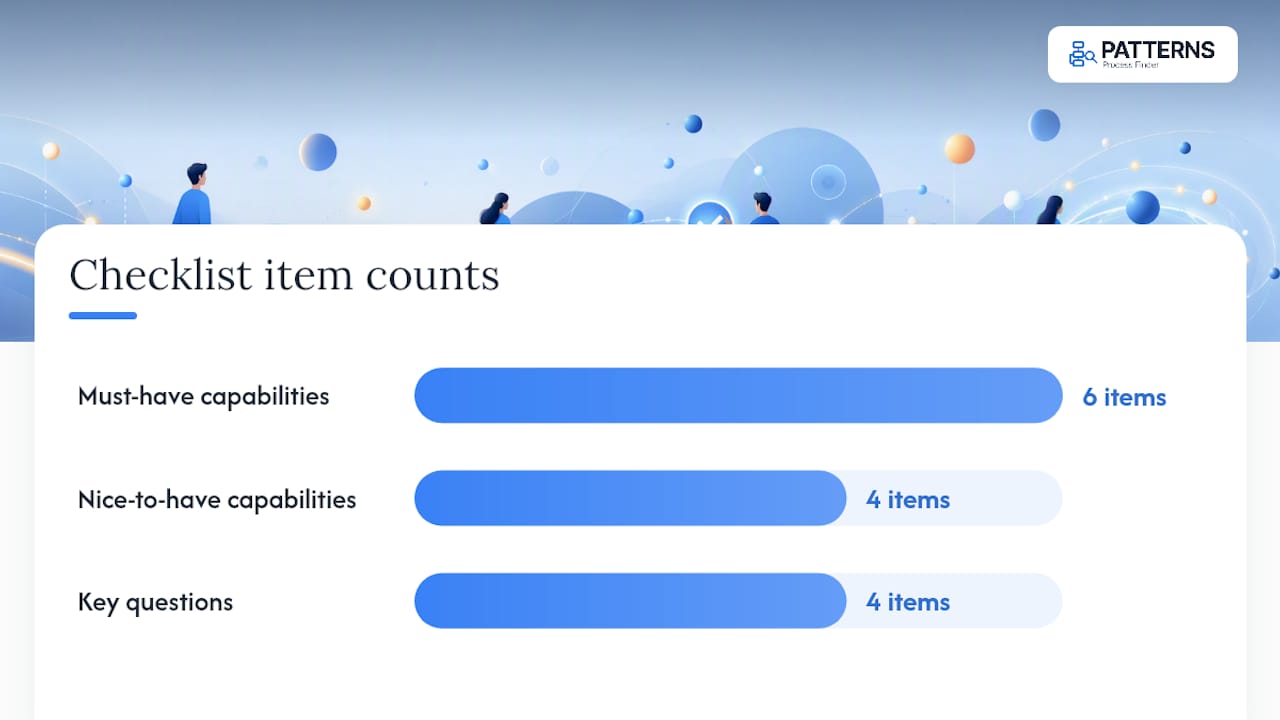
Must-have capabilities:
- Element-aware logging, not just mouse coordinates, so recordings survive interface changes
- Coverage across desktop, office, and browser applications in one unified log
- Built-in screenshot and annotation support
- Event abstraction that maps raw actions to business-meaningful steps
- Variant detection, so the tool flags deviations rather than assuming one true process
- Export to standard process-mining formats and enterprise-grade governance controls
Nice-to-have capabilities:
- Automatic script generation or direct RPA integration
- Configurable abstraction rules for industry-specific workflows
- Built-in ROI dashboards tracking automation yield over time
- Integration with your CMDB or identity provider for access control
- Does the tool capture UI elements or just screen coordinates?
- Can it cover every application your target process touches, including legacy systems?
- Does it produce a usable DFG or process map without custom engineering?
- What governance and encryption standards does it meet out of the box?
Score must-haves as pass/fail, then weight nice-to-haves by how much they reduce manual analyst work.
Turning recordings into a working automation pipeline
Everything above (the pipeline, the outputs, the governance checklist) describes what a mature recording program needs to deliver. Patterns Process Finder was built directly against that checklist.
Patterns automates log recording across desktop and browser applications, pairs every captured event with a screenshot and annotation support, and runs variant detection to surface the client-specific rules and exceptions that generic documentation always misses. The output isn’t a static flowchart. It’s a living SOP that updates as the underlying work changes, which is the difference between documentation someone reads once and documentation your automation team can actually build against.
For operations leaders tired of automation projects that fail because the documented process didn’t match reality, that gap is exactly what Patterns closes. Start by exploring the process mining tool to see how recorded logs translate into automation candidates, or go straight to requesting a demo with your own pilot process in mind.
What actually surprises teams during a recording pilot
Most teams expect the pilot to confirm what their documented SOP already says. It rarely does. The bigger surprise is usually how many “one process” workflows turn out to be three or four regional variants held together by tribal knowledge, and how often the friction shows up at system handoffs rather than inside any single application. Keep annotation lightweight during the pilot. Heavy tagging requirements slow down analysts and make teams reluctant to review a full week of recordings.
Sources
- SmartRPA: Generating software robots from user interface logs (ScienceDirect)
- Recorder function in robotic process automation (NiCE)
- What is process discovery? A practical guide for 2026 (Scribe)
FAQ
What does “record user actions” mean in process discovery?
It refers to software that captures real employee workflows across desktop and web applications to build process maps, living SOPs, and automation candidate lists, not browser testing tools.
How long should a recording pilot run?
Most pilots run 2 to 4 weeks with 5 to 10 representative users, followed by a validation phase where analysts label exceptions before scaling.
Do recordings replace the need for analyst review?
No. Process recorders speed up capture, but analysts still need to review recordings to distinguish genuine process steps from pauses and exceptions.
What’s the difference between coordinate-based and element-aware logging?
Coordinate-based logging tracks screen positions and breaks when layouts change, while element-aware logging tracks the underlying UI object and survives interface updates.
Can Patterns Process Finder generate SOPs directly from recordings?
Yes. Patterns Process Finder captures desktop and browser activity, pairs events with screenshots and annotations, and generates living SOPs that update as the recorded process changes.