
Bot exception handling: the developer’s production guide
Design your bots to classify every exception, apply automated recovery where it is safe to do so, and route everything else to a human or a dead-letter queue. That single discipline separates a production-ready automation from a fragile demo.
Quick-start checklist:
- Classify each exception as business, system, transient, or data before deciding on a response
- Apply retry with exponential backoff and a hard limit (a small number of attempts is commonly recommended) for transient failures
- Route unresolvable items to a dead-letter queue with a full structured log entry
- Define a human-in-the-loop path for every business exception that requires judgement
- Attach a structured log record, including a trace ID, to every exception event
- Assign an SLA to each exception class so resolution time is measurable and owned
Key takeaways
Effective bot exception handling requires classifying every exception correctly, applying the right automated recovery pattern, and using operational data to reduce exception volume over time.
| Point | Details |
|---|---|
| Classify before responding | Assign every exception to a class (transient, business, data, environmental) before selecting a recovery pattern. |
| Retry conservatively | Use three attempts with exponential backoff and jitter for transient failures; never retry business or data exceptions. |
| Log every exception structurally | Capture timestamp, trace ID, work item ID, step ID, input snapshot, and screenshot reference for every failure event. |
| Own the DLQ actively | Assign a named reviewer and a weekly triage cadence; a growing DLQ signals unresolved systemic failures. |
| Use discovery to find hotspots | Patterns Process Finder surfaces hidden subprocess branches and exception-causing variations that log data alone cannot reveal. |
Table of Contents
- What is bot exception handling, and why does it matter?
- What types of exceptions will your bots actually encounter?
- Which handling pattern fits which exception class?
- How do you implement exception handling in UiPath, Automation Anywhere, Blue Prism, IBM RPA, and Robot Framework?
- How do you design an end-to-end exception workflow?
- What should you log, and how do you monitor exception trends?
- How do you test exception handlers before they reach production?
- Which metrics tell you whether your exception programme is improving?
- How does process discovery reduce exception volume over time?
- What practitioners get wrong about exception priorities
- Fewer exceptions start with knowing where they come from
- Sources
- FAQ
What is bot exception handling, and why does it matter?
Bot exception handling is the practice of detecting, classifying, and responding to errors that occur during automated execution so that bots recover gracefully, escalate predictably, and leave a clear audit trail. A mature exception-management framework begins by reliably detecting exceptions, classifying them as technical, business, or transient, and mapping each class to a predefined automated triage and recovery strategy.
The distinction between exception catching and exception handling matters. Catching means your code does not crash. Handling means the bot takes the right action, logs the right data, and leaves the process in a recoverable state.
Core glossary:
- Exception: any condition that prevents a bot from completing a step as designed
- Business exception: a valid process outcome that requires human judgement (missing purchase order, amount over approval threshold)
- System/technical exception: an infrastructure or application failure the bot cannot control (HTTP 503, database timeout, UI selector not found)
- Transient exception: a temporary failure expected to resolve on retry (brief network blip, rate-limit response)
- Fatal exception: a failure that cannot be retried and must be escalated or abandoned
- Dead-letter queue (DLQ): a holding queue for work items that have exhausted all automated recovery options
- Human-in-the-loop (HITL): a workflow step that pauses automation and routes the item to a person for review or decision
- Compensation: a set of rollback or corrective actions that undo partial work after a failure
- Idempotency: the property of an operation that produces the same result whether it runs once or multiple times, making safe retries possible
Treating business exceptions and system exceptions with the same retry policy is one of the most common and costly mistakes in RPA design. A missing purchase order will not fix itself after three retries. Route it to a human immediately.
Why does the classification matter operationally? Because the wrong response wastes time and corrupts data. Retrying a business exception floods a human queue with noise. Escalating a transient network blip to a supervisor wastes resolution capacity. Getting the classification right at the point of detection is the highest-leverage decision in the entire RPA exception handling design.
What types of exceptions will your bots actually encounter?
Every production automation encounters five broad exception categories. Recognising which category you are dealing with determines the correct response pattern.
Business exceptions arise from the data or the process rules, not the technology. A vendor invoice with no matching purchase order, a refund request above the automated approval limit, or a customer record flagged for manual review are all business exceptions. The bot has done its job correctly; the process simply requires human judgement to proceed.
Application exceptions occur when the target application behaves differently than the bot expects. A UI selector that breaks after a software update, a button that moves position after a page redesign, or a pop-up dialog that appears only in certain browser versions all fall here. The symptom is often a “element not found” or “timeout waiting for element” error.
System exceptions are infrastructure failures: HTTP 503 responses from an API, database connection timeouts, memory exhaustion, or a downstream service that is temporarily unavailable. These are typically transient and respond well to retry logic.
Data exceptions originate in the input payload itself. A malformed JSON body, a date field in an unexpected format, a required field that is null, or a character encoding mismatch will all cause a bot to fail at the parsing or validation step. These are not transient; retrying the same malformed record produces the same failure.
Environmental exceptions are platform-level failures: disk full, insufficient permissions, a locked file, or a missing network share. They often affect multiple bots simultaneously and require infrastructure intervention rather than workflow-level handling.
Classifying by signal:
- HTTP 4xx status codes with a fixed payload → data or business exception; do not retry
- HTTP 5xx or connection timeout → system/transient exception; retry with backoff
- “Element not found” after a known UI release → application exception; alert and pause
- Input validation failure on a required field → data exception; route to DLQ with the original payload
- “Access denied” or “disk full” → environmental exception; alert operations immediately
The same symptom can map to different categories depending on context. A timeout on a database query during peak load is transient. The same timeout on a query that has never succeeded in testing is a configuration or data problem. Inspect the error string, the HTTP status code, and the input record together before assigning a category.
Which handling pattern fits which exception class?
The core mapping is straightforward: transient failures get retry with backoff, provider degradation gets a circuit breaker or fallback, business exceptions go to a human, partial failures get compensation, and exhausted items go to the dead-letter queue.
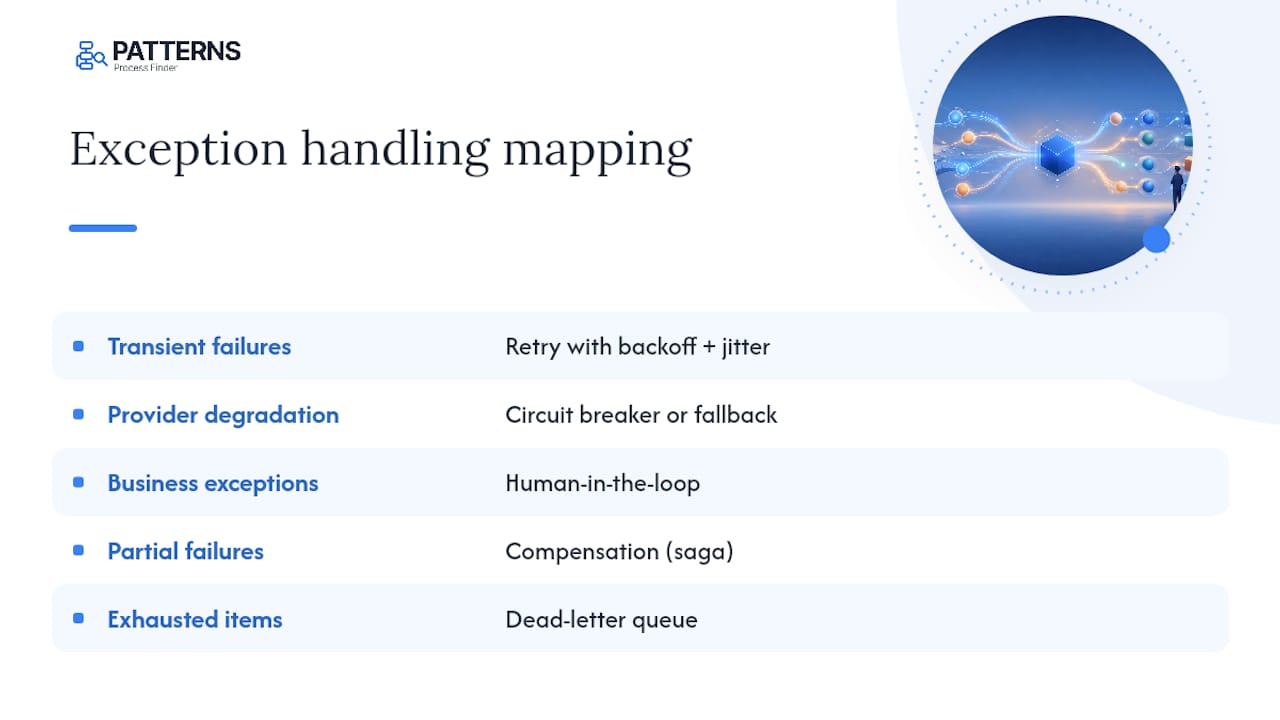
Architecture guidance for RPA identifies retry with exponential backoff, dead-letter queues, and human-in-the-loop escalation as the standard patterns for queue-based bot systems. Here is how to apply each:
Retry with exponential backoff and jitter is appropriate for transient system exceptions where the underlying service is expected to recover. Production guidance recommends three retries as a common default before falling back or escalating, with each wait interval doubling and a random jitter added to prevent thundering-herd collisions. For a typical enterprise API integration, a starting interval of two seconds, doubling to four and then eight, covers most transient blips without holding up the queue.
Pro Tip: Set your jitter as a random value between 0 and the current backoff interval, not a fixed offset. This distributes retry storms across a wider time window and reduces the chance of multiple bots hammering a recovering service simultaneously.
Circuit breaker monitors failure rates against a downstream dependency. When failures exceed a threshold within a rolling window, the breaker opens and subsequent calls fail fast without attempting the integration. This protects both the bot and the downstream system during an outage. After a configured cool-down period, the breaker moves to a half-open state and allows a probe request through.
Fallback routes the work item to an alternative provider or a degraded-mode path when the primary integration is unavailable. Multi-provider fallback chains are particularly relevant for AI agent workflows where a primary model endpoint may be rate-limited or down.
Human-in-the-loop (HITL) is the correct response for business exceptions. Treat business exceptions as workflow artefacts requiring a human task, not as errors to retry. The bot should pause the transaction, create a task record with the full context, notify the responsible team, and wait for a resolution input before resuming.
Compensation (saga pattern) applies when a multi-step process has partially completed and the failure occurs mid-sequence. Rather than leaving the system in an inconsistent state, the bot executes a series of compensating actions to undo the completed steps. This requires that each step be designed with a corresponding rollback action.
Dead-letter queue is the terminal destination for items that have exhausted retries, cannot be compensated, and cannot be resolved by the bot. Every DLQ entry must carry a complete structured log so a human reviewer can understand exactly what happened and decide on remediation.
Idempotency is a design property, not a pattern in isolation. Before applying any retry, confirm the operation is idempotent. Submitting a payment twice is not the same as reading a record twice. Tag non-idempotent operations and either make them idempotent (via idempotency keys) or exclude them from automatic retry.
How do you implement exception handling in UiPath, Automation Anywhere, Blue Prism, IBM RPA, and Robot Framework?
Each major RPA platform exposes exception handling through a different set of primitives, but the underlying patterns are the same. Here is how to configure them per platform.
The platform you choose determines how much of the exception-handling scaffolding is built in versus how much you must wire together yourself. Knowing where each platform draws that line saves significant debugging time.
UiPath
UiPath uses a Try Catch Finally activity block. Place all critical workflow steps inside the Try block. The Catches section accepts specific exception types (BusinessRuleException, SelectorNotFoundException, ApplicationException) so you can route each class differently. The Finally block runs cleanup steps regardless of outcome, which is the right place to close applications, release locks, and log the final state.
For queue-based automations, UiPath Orchestrator’s transaction retry count and the SetTransactionStatus activity handle retry logic at the queue level. Set the maximum retry count on the queue item itself, not inside the workflow, so the policy is configurable without a code deployment.
Automation Anywhere
Automation Anywhere uses Try/Catch/Finally blocks within its Task Editor. Exception types are caught by error code or error message pattern. The platform’s Control Room manages bot queues and work item status, and you can configure retry attempts directly on the queue configuration. For HITL, the Automation Co-Pilot (formerly AARI) provides a human task interface that bots can push items to when a business exception is detected.
Blue Prism
Blue Prism handles exceptions through its Exception and Recover stages within process diagrams. The Recover stage catches the most recent exception and allows the process to branch based on exception type and message. Blue Prism distinguishes between internal exceptions (thrown by the process itself) and system exceptions (thrown by the platform or target application). Work queues in Blue Prism track retry counts natively; configure the maximum retry attempts on the queue definition.
IBM RPA
IBM RPA documentation recommends wrapping critical bot operations in try/catch constructs with explicit cleanup steps so bots can restart from a known state after an error. IBM RPA scripts use Try, Catch, and Finally blocks in its scripting language (WAL). The Finally block is particularly important for releasing browser sessions, closing desktop applications, and writing the final log entry before the script exits.
Robot Framework / Python
Robot Framework uses keywords and the Run Keyword And Ignore Error or Run Keyword And Expect Error built-ins for simple cases, but production-grade handling belongs in a Try / Except / Finally block inside a Python library keyword.
import logging
import time
import random

def execute_with_retry(operation, max_retries=3, base_delay=2.0):
    """
    Execute an operation with exponential backoff and jitter.
    Raises the last exception if all retries are exhausted.
    """
    last_exception = None
    for attempt in range(1, max_retries + 1):
        try:
            return operation()
        except TransientException as exc:
            last_exception = exc
            if attempt == max_retries:
                break
            delay = base_delay * (2 ** (attempt - 1))
            jitter = random.uniform(0, delay)
            logging.warning(
                "Transient failure on attempt %d/%d. "
                "Retrying in %.2fs. Error: %s",
                attempt, max_retries, delay + jitter, exc
            )
            time.sleep(delay + jitter)
        except BusinessException as exc:
            logging.error("Business exception — routing to HITL: %s", exc)
            route_to_human_queue(exc)
            return  # Do not retry business exceptions
        except Exception as exc:
            logging.critical("Fatal exception — moving to DLQ: %s", exc)
            move_to_dead_letter_queue(exc)
            raise
    move_to_dead_letter_queue(last_exception)
    raise last_exception
Example structured log entry fields (include all of these for every exception event):
timestamp: 2026-03-14T09:22:41.003Z
bot_id: inv-processor-07
work_item_id: WI-00482
step_id: validate_po_number
exception_type: BusinessException
exception_message: "PO number PO-99123 not found in ERP"
retry_count: 0
input_snapshot: { "invoice_id": "INV-2024-0091", "po_number": "PO-99123" }
stack_trace: [truncated]
screenshot_ref: s3://bot-logs/inv-processor-07/WI-00482/step-validate-po.png
sla_impact: HIGH
trace_id: 4bf92f3577b34da6
For UI-driven failures, capture a screenshot at the point of exception and store the reference in the log. Industry best practice recommends cleaning up temporary state, restarting the application to a known state, and logging the screenshot before moving to the next transaction.
Pega’s robotic automation documentation details exception components and configuration points for catching, filtering, and routing exceptions inside robotic flows, which is a useful reference when configuring exception properties in workflow engines beyond the platforms listed here.
| Platform | Try/catch primitive | Queue retry config | HITL mechanism | DLQ support |
|---|---|---|---|---|
| UiPath | Try Catch Finally activity | Orchestrator queue item retry count | Action Centre tasks | Orchestrator queue status |
| Automation Anywhere | Try/Catch/Finally block | Control Room queue config | Automation Co-Pilot | Queue item failure status |
| Blue Prism | Exception / Recover stages | Work queue retry attempts | Human task stage | Queue exception status |
| IBM RPA | WAL Try/Catch/Finally | Script retry configuration | Human task activity | Script error routing |
| Robot Framework | Python Try/Except/Finally | Custom retry keyword | External task API | Custom DLQ keyword |
How do you design an end-to-end exception workflow?
An effective exception workflow follows five stages: detect, classify, attempt automated recovery, escalate to HITL, and route to DLQ with root-cause analysis (RCA) if recovery fails.
Stage-by-stage flow:
- Detect: the bot catches the exception at the point of failure and captures the full context (step, input, error message, timestamp)
- Classify: apply classification logic (status code, error type, input validation result) to assign a category
- Automated recovery: execute the appropriate pattern (retry, fallback, compensation) based on the category
- HITL escalation: if automated recovery is exhausted or the exception is a business type, create a human task with full context and notify the owner
- DLQ and RCA: if the human task cannot be resolved within SLA, move the item to the DLQ and trigger an RCA ticket
Ownership and SLA checklist:
- Assign a named owner (team or role) to each exception class, not just to the bot
- Define resolution SLAs: transient exceptions resolved within minutes by the bot; business exceptions resolved by a human within four hours; environmental exceptions escalated to operations within 15 minutes
- Design HITL tasks to include all data the reviewer needs without requiring them to open the source system
- Build a “resume on input” path so the bot can continue the transaction after the human provides a decision
- Document the escalation path in your exception handling SOPs so any team member can follow it
Pro Tip: Push business exception notifications to a dedicated Slack channel or Teams channel, not just an email inbox. Response times drop significantly when the alert appears in the tool the team already monitors.
For routing, push items to a business queue in your RPA platform, send a notification to the responsible supervisor, and attach an incident playbook link so the reviewer knows exactly what actions are available. The automation centre of excellence governance model is a useful reference for defining who owns exception resolution across multiple bot programmes.
What should you log, and how do you monitor exception trends?
Structured exception records plus trace IDs are the highest-leverage observability investment for reducing mean time to resolution. Without a trace ID, correlating a bot failure to a downstream service event is guesswork. Without a structured record, searching logs for patterns across thousands of transactions is impractical.
Essential fields for every exception log entry:
timestamp(ISO 8601, UTC)bot_idandbot_versionwork_item_idandprocess_namestep_id(the exact step where the failure occurred)exception_typeandexception_messagestack_trace(full, not truncated)retry_countat time of logginginput_snapshot(sanitised copy of the input record)screenshot_ref(for UI-driven failures)sla_impact(HIGH / MEDIUM / LOW)trace_id(shared across all services touched in the transaction)
For SOC 2 logging requirements and audit purposes, retain exception logs for at least 12 months and ensure they are tamper-evident.
Metrics to track and alert on:
| Metric | Definition | Alert threshold |
|---|---|---|
| Exception rate by type | Exceptions per 1,000 transactions, segmented by class | Greater than 5% for any single class |
| MTTR | Mean time from exception detection to resolution | Greater than SLA target for that class |
| DLQ size | Count of unresolved items in the dead-letter queue | Any growth trend over time |
| Manual-resolution time | Average time a human spends resolving one HITL task | Greater than several minutes per task |
| Retry success rate | Percentage of retried items that succeed on a subsequent attempt | Below 80% suggests a non-transient root cause |
| Automation availability | Percentage of scheduled bot runtime with no fatal failures | Below 99% triggers an incident review |

Integrate logs with ELK Stack, Splunk, or Azure Monitor by shipping structured JSON log entries from your bot platform. For distributed automations that span multiple services, instrument OpenTelemetry traces so you can follow a single transaction across the bot, the API, and the database in one trace view. Alert on DLQ growth and MTTR breaches in your monitoring platform, not just in the RPA console.
How do you test exception handlers before they reach production?
Test handlers with controlled fault injection and dedicated unit tests for retry and compensation logic. Waiting for production failures to validate your exception handling is the most expensive testing strategy available.
Testing checklist:
- Unit tests for retry logic: mock the downstream service to return HTTP 503 on the first two calls and HTTP 200 on the third. Verify the bot retries exactly three times, waits the correct intervals, and succeeds on the final attempt.
- Unit tests for business exception routing: inject a work item with a missing required field. Verify the bot creates a HITL task, logs the correct exception type, and does not retry.
- Integration tests with mocked error responses: use WireMock, Mockoon, or a similar HTTP mock server to simulate the full range of error codes your integration may return (400, 401, 403, 404, 429, 500, 503).
- Compensation tests: simulate a mid-sequence failure after two of five steps have completed. Verify that all compensating actions execute in reverse order and the system returns to its pre-transaction state.
- Chaos / fault-injection tests: in a staging environment, introduce random latency, kill a downstream service mid-transaction, and corrupt an input payload. Verify the bot classifies correctly and routes to the right destination.
- HITL user-acceptance tests: have a real reviewer work through a HITL task created by the bot. Verify the task contains all necessary context, the resume path works, and the bot continues correctly after the human decision.
Debugging steps when a handler misbehaves in production:
- Pull the structured log entry for the failed work item using the
work_item_id - Check the
retry_countfield to determine whether the retry policy fired - Compare the
exception_typein the log against the classification logic in your code - Reproduce the failure in a staging environment using the
input_snapshotfrom the log - Check whether the downstream service returned a different status code than your handler expected
Pro Tip: Store the input_snapshot in your exception log as a sanitised copy of the exact input record, not a reference to the source system. This lets you replay the exact failing scenario in staging without needing to reconstruct the original data state.
A real-world consequence of unmanaged bot errors is illustrated by the Air Canada chatbot case, where a tribunal held the airline liable for a refund policy the bot invented. Robust exception handling and clear escalation paths to human agents are not optional features in customer-facing automations.
Which metrics tell you whether your exception programme is improving?
Track both technical and business exception KPIs and use them for prioritisation. A declining exception rate without a corresponding decline in manual-resolution time means you are catching more but fixing less.
Key metric definitions and targets:
- Failure rate: exceptions per 1,000 transactions. Target below 5% for mature automations; above 10% signals a systemic process or data problem.
- MTTR: mean time from detection to resolution. Target varies by SLA class; transient exceptions should resolve in under five minutes automatically.
- Manual-handling rate: percentage of transactions that require human intervention. A rising rate indicates either new exception types or a classification problem.
- DLQ growth rate: net new items added to the dead-letter queue per day. Any sustained growth requires an RCA sprint.
- Automation availability: percentage of scheduled runtime without a fatal failure. Below 99% warrants an incident review.
RCA checklist for recurring exception signatures:
- Identify the top three exception types by volume each week
- For each, trace back to the root cause: data quality, process variation, application change, or infrastructure instability
- Assign a remediation owner and a target resolution date
- Track whether the exception rate for that type declines after the fix is deployed
- Feed confirmed root causes back into your visual process mapping and SOP documentation so the fix is captured as a process change, not just a code patch
| Metric | Target | Review cadence |
|---|---|---|
| Exception rate by type | Below 5% per class | Weekly |
| MTTR | Within SLA per class | Daily |
| DLQ size | Zero growth trend | Daily |
| Manual-handling rate | Declining quarter over quarter | Monthly |
| Automation availability | Above 99% | Weekly |
How does process discovery reduce exception volume over time?
Process discovery reduces exception volume by exposing the hidden subprocess branches and common failure points that conventional documentation misses. When bots are built against documented processes rather than observed ones, the gap between “how work is supposed to happen” and “how it actually happens” becomes a direct source of exceptions.
The most persistent exception hotspots in production automations are almost never in the main happy path. They live in the subprocess variations that no one wrote down: the client-specific rule, the workaround that became standard practice, the edge case that only appears on the last business day of the month.
Patterns Process Finder automates the discovery of real workflows by recording actual user actions across desktop and browser applications. This surfaces subprocess variations, client-specific rules, and exception-causing edge cases that would otherwise only appear after a bot goes live. The result is automation pipelines built on genuine process intelligence rather than idealised documentation.
A typical discovery-to-remediation cycle looks like this: a team runs a discovery snapshot on the process with the highest exception rate, identifies three subprocess branches that the bot was never designed to handle, updates the bot logic and the SOP to cover those branches, and measures the exception rate over the following two weeks. The living SOP generation that Patterns produces means the documentation stays current as the process evolves, reducing the drift that causes new exceptions to appear after process changes.
Workflow impact metrics to measure after a discovery cycle:
- Reduction in exception rate for the targeted process (measure week-over-week for four weeks)
- Decrease in DLQ item volume for that process
- Reduction in average manual-resolution time for HITL tasks
- Increase in automation availability for the affected bot
Teams facing high automation failure rates benefit most from discovery because it identifies the most impactful fixes first, rather than requiring developers to guess at root causes from log data alone.
What practitioners get wrong about exception priorities
Most teams I see treat exception handling as a finishing step, something to add after the happy path works. That instinct is backwards. The exception paths are where production automations actually spend most of their time, and the cost of getting them wrong compounds quickly.
The first priority when a bot is throwing a high volume of exceptions is not to fix every exception type. It is to stop the biggest single failure cause. One exception type almost always accounts for a disproportionate share of the volume. Find it, fix it, and measure the impact before moving to the next one.
The second priority is infrastructure stability. Retry logic built on an unstable queue or a misconfigured circuit breaker will amplify failures rather than contain them. Stabilise the platform before tuning the handlers.
Third: add observability before adding more automation. A team that cannot see what its bots are doing in real time will spend more time debugging than building. Structured logs and trace IDs are not a nice-to-have; they are the foundation of every other improvement.
Finally, triage the DLQ on a fixed cadence. A DLQ that grows unchecked becomes a liability. Items in the DLQ represent real business transactions that have not completed. Assign a weekly DLQ review to a named owner, not to “the team.”
On organisational alignment: exception reduction should be owned by the same team that owns the automation’s SLA. If the bot team and the business team have separate accountability, exceptions fall into the gap between them. Short SLAs, clear ownership, and a shared dashboard close that gap faster than any technical fix.
Fewer exceptions start with knowing where they come from
High exception rates are rarely a code problem alone. They are a process-intelligence problem. Bots built on incomplete or outdated documentation will keep generating the same exceptions until someone maps what actually happens at the step level.
Patterns Process Finder captures real user workflows across desktop and browser applications, surfaces the subprocess branches and client-specific rules that cause the most exceptions, and generates living SOPs that keep bot logic aligned with how work actually executes. For teams with a high manual-handling rate or a growing DLQ, the fastest path to fewer exceptions is a discovery snapshot on the process with the worst exception rate. Patterns identifies the hotspots, maps the variations, and gives your developers the process intelligence they need to fix the right things first. Start with a free workflow capture trial or explore the process mining tool to see where your exception volume is actually coming from.
Sources
- rpa-architecture-design-patterns
- Exception Management Framework for Automation
- Building Reliable Agent Error Handling — Retry, Fallback, and Circuit Breaker Patterns for Production AI Agents
FAQ
What is bot exception handling?
Bot exception handling is the practice of detecting, classifying, and responding to errors during automated execution so that bots recover gracefully, escalate predictably, and maintain a complete audit trail rather than simply crashing or silently failing.
What happens when an RPA bot encounters an exception in a business process?
The bot should catch the exception, classify it as business, system, transient, or data, and apply the appropriate response: retry for transient failures, immediate human-in-the-loop routing for business exceptions, or dead-letter queue placement for items that cannot be resolved automatically.
How do you handle exceptions in Robot Framework?
Use Python library keywords with Try / Except / Finally blocks for production-grade handling. The Finally block handles cleanup (closing sessions, releasing locks, writing the final log entry), while Except branches route each exception class to the correct response: retry, HITL, or DLQ.
What is a bot error, and how is it different from an exception?
A bot error is a general term for any failure during automated execution. An exception is the specific, catchable event that the bot’s code can detect and respond to programmatically. All exceptions are errors, but not all errors are caught as exceptions; unhandled errors typically cause the bot to terminate without logging useful context.
What is the right retry count for transient bot exceptions?
Three retries with exponential backoff and jitter is the commonly recommended default for production automations. Beyond three attempts, the probability that the failure is non-transient rises sharply, and continued retrying delays DLQ routing and human review.