
How to design an automation pipeline that actually works
Effective automation pipeline design starts with one principle: build from observed reality, not assumed process maps. The recommended blueprint follows seven stages: capture → discover → prioritise → build → test → deploy → monitor. Every stage feeds the next, and the whole pipeline depends on the quality of what you record in the early stages.
Three benchmarks anchor this approach:
- A two-to-four-week capture window produces enough behavioural data to surface 30–50 candidate processes before filtering.
- Regular re-discovery at intervals of several months keeps your automation inventory aligned with how work actually evolves.
- AI-powered discovery reduces time-to-insight significantly by automatically scoring candidates by ROI potential.
Patterns Process Finder supports each of these stages through automated desktop capture, variant clustering, and living SOP generation — giving operations leaders and RPA developers a single platform to move from raw telemetry to production-ready bots.
Key takeaways
Reality-based automation pipeline design — grounded in observed user behaviour rather than assumed process maps — produces more reliable bots, faster prioritisation, and SOPs that stay accurate as processes evolve.
| Point | Details |
|---|---|
| Capture window matters | A 2–4 week capture period yields 30–50 candidate processes before filtering. |
| Score before you build | Rank candidates by volume, manual effort, error rate, and exception frequency to protect developer time. |
| Validate variants early | Clustering often fragments one apparent routine into several; catch this before development begins. |
| Governance from day one | Immutable audit logs, PII masking, and RBAC are required for SOC 2 readiness, not optional add-ons. |
| Patterns Process Finder | Automates capture, variant clustering, living SOP generation, and ROI scoring across the full pipeline. |
Table of Contents
- What does each stage of an automation pipeline deliver?
- What telemetry should you capture, and how do you keep it privacy-safe?
- How does automated discovery actually segment routines from raw logs?
- How do you score and prioritise automation candidates by ROI?
- Script synthesis versus manual build: which approach fits your pipeline?
- How do you test, pilot, and deploy automations safely at enterprise scale?
- How do you keep automations reliable as processes drift over time?
- What governance and security controls does enterprise automation require?
- Is your organisation ready to run a discovery-driven automation programme?
- Your 90-day pilot checklist: milestones, roles, and deliverables
- How Patterns Process Finder supports every stage of your pipeline
- Patterns Process Finder gives your pipeline a foundation in real data
- Sources
- FAQ
What does each stage of an automation pipeline deliver?
A well-structured pipeline is not a linear checklist. It is a feedback loop where monitoring outputs feed back into discovery, and discovery continuously refreshes your candidate backlog.
| Stage | Key Output | Primary Owner |
|---|---|---|
| Capture | Anonymised UI event logs, app context, timestamps | COE / IT |
| Modelling | Process variants and frequency maps | Business analyst |
| Segmentation / Discovery | Routine traces, variant clusters | COE / analyst |
| Candidate selection | Scored, prioritised automation backlog | COE lead |
| Development / Synthesis | RPA scripts or auto-generated flows | Developer |
| Testing / Staging | Validated scripts, test artefacts | Developer / QA |
| Deployment / Orchestration | Live bots with scheduling and credentials | COE / IT |
| Monitoring / Living SOPs | Drift alerts, updated SOPs, audit trail | COE / business owner |
Automated process discovery platforms that combine desktop capture with process mining provide a unified intelligence layer covering both human-driven and system-driven variants — a meaningful advantage over tools that handle only one signal type.
What telemetry should you capture, and how do you keep it privacy-safe?
The minimum telemetry set for reliable discovery includes UI events (clicks, keystrokes, field values), application context, timestamps, OCR snapshots for unstructured screens, API and event logs where accessible, and anonymised user and role metadata.
Capture guidance at a glance:
| Parameter | Recommended Value |
|---|---|
| Capture window | 2–4 weeks |
| Candidate inventory target | 30–50 processes (pre-filter) |
| Re-discovery cadence | Every 6–12 months |
| Minimum distinct users per process | 3–5 for statistical confidence |
Privacy and retention controls are non-negotiable at enterprise scale. PII fields — names, account numbers, health data — must be masked at the agent level before logs leave the endpoint. Retention schedules should align with your data governance policy; ninety days is a common working window before archival or deletion. SOC 2-style logging requires immutable write-once records of who captured what, when, and under which consent model.
Core privacy controls:
- Dynamic PII masking applied at capture, not post-processing
- Role-based consent model with documented employee notice
- Immutable audit log of all capture sessions and data access events
- Retention schedule defined and enforced at the data layer
Pro Tip: Before passing logs to your segmentation layer, run a dedicated noise-filtering pass to strip single-occurrence actions, system idle events, and navigation artefacts. Logs that skip this step produce fragmented routine traces and inflate your false-positive rate downstream.
How does automated discovery actually segment routines from raw logs?
The SmartRPA research pipeline demonstrates the core approach: segment UI logs using end-delimiters, apply frequent-pattern identification to extract routine traces, cluster variants, and then pass candidate routines through human-in-the-loop filtering before synthesis. Unsupervised segmentation on noisy real-world logs remains fragile; semi-supervised inputs that define where one task ends and another begins are still the reliable path.
Common failure modes to watch for:
- Noisy clicks: repeated micro-interactions that look like distinct actions but are navigation artefacts
- Interleaved routines: two processes sharing a screen, making segmentation boundaries ambiguous
- One-off actions: idiosyncratic steps performed by a single user that inflate variant counts
- Missing end-delimiters: logs without clear task boundaries produce overlapping routine traces
Human-in-the-loop validation is the control that catches what algorithms miss. Subject-matter experts review a sample of extracted traces, apply declarative constraints (for example, “this step must always precede that one”), and sign off before any candidate advances to development.
Discovery quality metrics to track:
- Precision: what fraction of detected routine traces are genuinely repeatable processes
- Recall: what fraction of actual routines in the log were detected
- Aim for precision above 80% and recall above 70% before advancing candidates to scoring
A precision target below 80% means your developers will spend more time discarding bad candidates than building good ones.
Pro Tip: Validate variant coverage early — before prioritisation, not after. A routine that looks high-volume in aggregate may fragment into a dozen low-volume variants once clustering runs. Catching that early saves a sprint of wasted development effort.
How do you score and prioritise automation candidates by ROI?
Scoring removes the politics from prioritisation. Evaluate each candidate against seven factors, then rank by weighted score.
- Volume: average monthly transaction count
- Manual effort: hours per transaction multiplied by fully-loaded labour cost
- Failure / error rate: percentage of transactions requiring rework
- Exception frequency: how often the routine deviates from the happy path
- Rule-based logic: degree to which decisions follow deterministic rules (higher = more automatable)
- Data structure quality: structured inputs score higher than unstructured or OCR-dependent ones
- Strategic value: alignment with cost-reduction or compliance priorities
A simple ROI formula: Annual savings = (volume × manual effort hours × hourly cost) × (1 − exception rate). Subtract estimated implementation cost and divide by that cost to get a payback ratio. A ratio above 2.0 within twelve months is a strong pilot candidate; below 1.0 within eighteen months, defer for re-discovery.
AI-powered discovery platforms score candidates automatically against ROI potential, cutting the time analysts spend on manual assessment from weeks to hours.
When to discard or defer a candidate:
- Exception rate above 40% with no clear rule set
- Dependency on an application scheduled for replacement within twelve months
- Insufficient log volume to validate variant coverage
Script synthesis versus manual build: which approach fits your pipeline?
Synthesise first when the target routine runs on a stable UI, executes frequently, and shows low variance across users. Task-mining platforms can convert recommended process sequences into active automation flows with click-to-automate features, dramatically shortening developer handoff time.
Manual build is preferable when exception logic is complex, the UI is dynamic, or the routine requires external API calls not captured in desktop logs.
Required development artefacts for every candidate:
- Routine-based log excerpt with annotated variants
- Variant specification listing all confirmed branches and exception rules
- Sample test data covering the happy path and at least two exception scenarios
- Acceptance criteria tied to KPIs from the discovery stage
Handoff checklist:
- Versioned script repository with environment specs (OS, app version, credential vault reference)
- Replay test against the captured baseline log
- Documented rollback procedure if the bot fails acceptance testing
Pro Tip: Attach the original discovery trace to every script ticket. Developers who can replay the exact sequence that generated the candidate build faster and introduce fewer logic errors than those working from a written specification alone.
How do you test, pilot, and deploy automations safely at enterprise scale?
Testing at enterprise scale requires four sequential gates before production.
- Unit tests: validate each script step against the variant specification in an isolated environment.
- Baseline replay: run the script against the captured log to confirm output parity with the human-performed version.
- Parallel run: execute bot and human simultaneously on live transactions; compare outputs before switching over.
- KPI parity check: confirm that error rate, throughput, and exception rate match or improve on the human baseline.
Pilot patterns that reduce production risk:
- Canary release: route 5–10% of live volume to the bot; monitor for 48–72 hours before expanding
- Business-unit pilot: deploy to one team or geography first; use their results as the scale decision gate
- Success criteria: define minimum acceptable success rate (typically 95%+) and maximum tolerable exception rate before the pilot begins
Deployment orchestration requires scheduling windows that avoid peak system load, concurrency limits that prevent credential contention, and a documented rollback trigger — typically two consecutive failed runs or a success rate drop below threshold.
How do you keep automations reliable as processes drift over time?
Bots degrade silently. The process they were built on changes; the bot does not. Monitoring must surface that gap before it becomes a production incident.
Key metrics to track continuously:
- Success rate per bot (target: 95%+)
- Exception rate and mean time to detect (MTTD)
- Mean time to remediate (MTTR) after an alert fires
- Variant growth rate in ongoing discovery logs
Drift detection and SOP maintenance:
| Signal | Recommended Action |
|---|---|
| Success rate drops below 90% | Trigger immediate review; pause bot if below 95% |
| New variant detected in re-discovery | Route to human-in-the-loop validation before updating script |
| SOP last reviewed > 6 months ago | Schedule revalidation with business owner |
| Audit log gap exceeding a day | Escalate to security reviewer |
Living SOPs generated from automated workflow capture stay aligned with real operations because they update from observed behaviour rather than from manual edits. Assign a named SOP owner for each process; that person approves changes, signs off on revalidation, and owns the change-history record.
What governance and security controls does enterprise automation require?
Minimum governance controls for any production deployment:
- Role-based access control (RBAC): separate permissions for capture agents, analysts, developers, and approvers
- Change approval workflow: no script reaches production without a documented review and sign-off
- Immutable audit logs: write-once records of every capture session, script change, and deployment event
- Credential vaulting: bot credentials stored in an enterprise vault (CyberArk, HashiCorp Vault, or equivalent); never hardcoded
Privacy controls aligned with North American regulations and SOC 2:
| Control | Requirement |
|---|---|
| PII discovery | Automated scan of logs before storage |
| Dynamic masking | Applied at capture agent, not at query time |
| Consent documentation | Written notice to employees; records retained |
| Anonymisation | Role and user IDs hashed before analyst access |
| Data residency | Logs stored within jurisdiction per applicable privacy law |
For SOC 2 Type II audit readiness, your logging stack must demonstrate continuous monitoring, defined retention periods, access reviews at least quarterly, and evidence that PII controls operated throughout the audit period — not just at point-in-time assessment.
Is your organisation ready to run a discovery-driven automation programme?
Technology is the easier half. The harder half is getting the right people aligned before the first capture agent deploys.
COE responsibilities in a discovery-driven programme:
- Own the prioritisation backlog and scoring model
- Govern tool selection, access controls, and vendor relationships
- Enable developers through training, reusable templates, and living SOP libraries
- Maintain the relationship between process documentation and bot performance
Stakeholder alignment and training essentials:
- Business owners must understand what capture agents record and what they do not
- Frontline employees need clear communication about consent, anonymisation, and how findings are used
- Developers need training on discovery outputs, variant specifications, and synthesis tools
- Security and compliance reviewers need access to audit logs and PII control evidence
Avoid “shadow automation” — bots built outside the COE without governance oversight. The automation centre of excellence model works when it provides genuine value to developers (faster prioritisation, better artefacts) rather than functioning as a bureaucratic gate.
Your 90-day pilot checklist: milestones, roles, and deliverables
Weeks 1–2: Discovery deployment
- COE lead deploys capture agents; IT confirms data residency and PII masking
- Security reviewer signs off on consent model and retention schedule
- Deliverable: capture environment live, baseline log collection underway
Weeks 3–4: Log validation and noise filtering
- Analyst runs noise-filtering pass; COE lead reviews segmentation quality
- Deliverable: clean log dataset ready for discovery run
Weeks 5–6: Candidate discovery and prioritisation
- Discovery run produces initial candidate list; COE lead scores against ROI model
- Business owner validates top five candidates against strategic priorities
- Deliverable: prioritised backlog of three to five pilot candidates
Weeks 7–8: Pilot development
- Developer builds scripts for top two candidates using discovery artefacts
- Deliverable: scripts in staging with variant specification and test cases
Weeks 9–10: Testing and parallel run
- QA runs unit tests, baseline replay, and parallel run
- Deliverable: KPI parity confirmed or issues documented for rework
Weeks 11–12: Pilot deployment and ROI review
- COE lead deploys to canary volume; monitors for 72 hours before full cutover
- Business owner reviews actual versus projected ROI
- Deliverable: pilot success report with scale recommendation
Pilot ROI measurement: compare actual hours saved per week against the estimate from your scoring model.
How Patterns Process Finder supports every stage of your pipeline
Patterns Process Finder maps directly to the pipeline stages described above. Its lightweight desktop agents capture UI events across browser and desktop applications without requiring code changes to source systems. Variant clustering surfaces hidden subprocess branches and client-specific rules that manual documentation consistently misses. The platform’s prioritisation dashboard scores candidates by volume, effort, and exception rate so COE leads can build a defensible backlog in hours rather than weeks.
Feature-to-stage mapping:
- Capture: privacy-conscious desktop agents with PII masking and consent controls built in
- Discovery / segmentation: automated variant clustering with human-in-the-loop validation gates
- Living SOPs: automated documentation that updates from observed behaviour, with change-history and owner assignments
- Governance: SOC 2-aligned audit logs, RBAC, and immutable change records
- Prioritisation: ROI-scored candidate dashboards with drill-down into variant detail
A typical mid-market pilot using Patterns Process Finder moves from capture deployment to a prioritised candidate backlog in a few weeks, significantly faster than using manual process interviews and workshop-based documentation.
Pro Tip: Use Patterns Process Finder’s living SOP output as the acceptance criterion for your pilot. If the bot’s behaviour matches the SOP, the pilot passes. If it diverges, the SOP tells you exactly where the gap is.
What practitioners learn from real deployments
Most automation programmes underestimate how much process variation exists before discovery runs. Workshop-based documentation captures the happy path; discovery uncovers the full variation, which often explains automation failures.
Three lessons that consistently surface in production deployments:
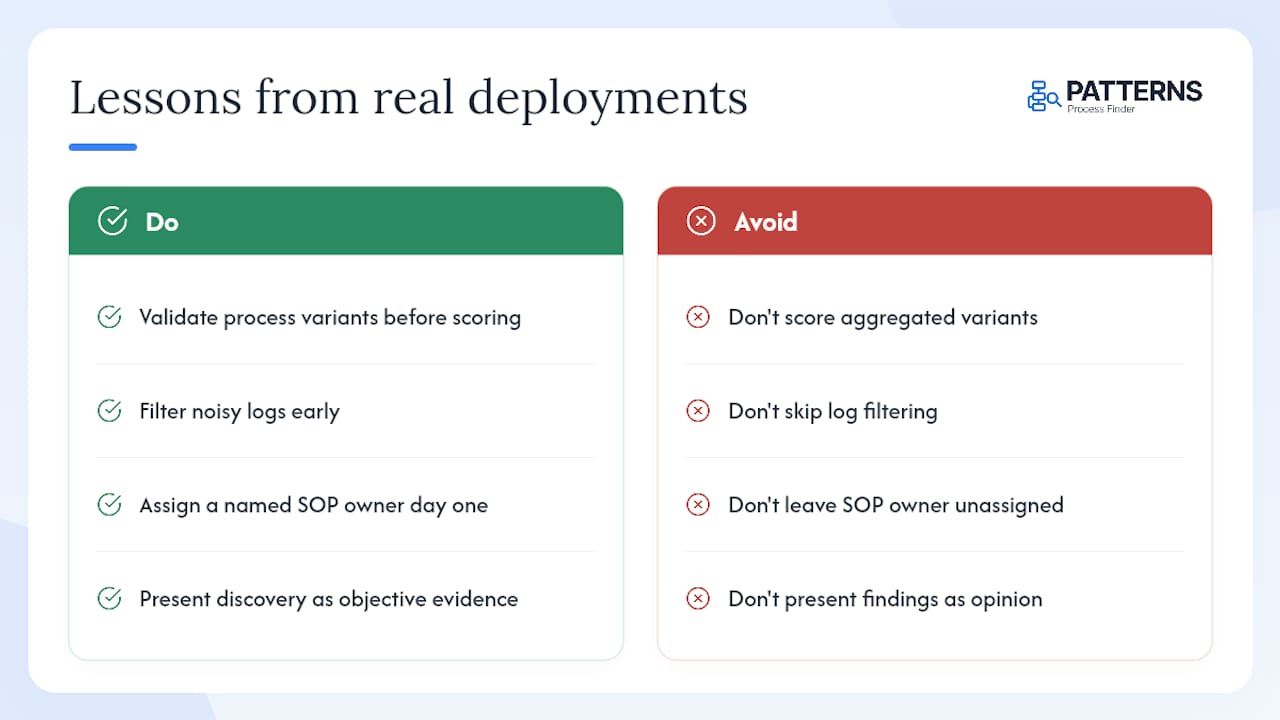
First, validate variants before you score candidates. A routine that looks like a single high-volume process often fragments into five or six variants once clustering runs. Scoring the aggregate inflates ROI projections and sets developers up for scope creep.
Second, invest in noise filtering before you invest in better algorithms. The quality of your segmentation output is almost entirely determined by the cleanliness of your input logs. A well-filtered log with a modest algorithm outperforms a noisy log with a sophisticated one.
Third, assign a named SOP owner on day one. Living SOPs only stay alive if someone is accountable for reviewing and approving changes. Without a named owner, documentation drifts back to the same stale state that made discovery necessary in the first place.
The cultural shift matters as much as the technology. COE teams that present discovery findings as objective evidence — rather than analyst opinions — get faster stakeholder sign-off and face less resistance when bots replace manual steps. Objective discovery maps let COEs justify investments with measurable ROI rather than estimates.
Patterns Process Finder gives your pipeline a foundation in real data
Most automation programmes stall not because the technology is wrong, but because the process intelligence underneath it is built on assumptions. Patterns Process Finder replaces those assumptions with observed reality: every candidate in your backlog comes from actual user behaviour, every SOP updates from live operations, and every governance record is audit-ready from day one.
For operations leaders running a 90-day pilot or RPA developers inheriting a backlog built on workshop notes, the process mining tool inside Patterns Process Finder gives you the event-log depth to validate what desktop capture surfaces. Privacy controls, SOC 2-aligned logging, and living SOP generation are included across paid tiers. Request a demo to see how quickly a real candidate backlog takes shape from your own process data.
Sources
- Process Discovery for RPA & Automation: 2026 Guide
- { agostinelli, marrella } SmartRPA paper
- Automation Finder | NiCE CX Products
FAQ
What is the recommended capture window for process discovery?
Two to four weeks is the standard benchmark, producing enough behavioural data to surface 30–50 candidate processes before filtering begins.
How often should you re-run discovery after initial deployment?
A re-discovery cadence of every six to twelve months keeps your automation inventory aligned with how processes actually evolve in production.
What precision and recall targets should discovery models meet?
How does Patterns Process Finder support living SOPs?
Patterns Process Finder generates SOPs directly from observed user behaviour and updates them continuously, with change-history records and named owner assignments for each process.
When should you choose script synthesis over manual RPA development?
Synthesise first for stable UIs, high-volume routines, and low-variance processes; build manually when exception logic is complex or the interface changes frequently.