
Automated documentation tool for living SOPs and RPA reliability
An automated documentation tool captures how work actually gets done across desktop and browser applications, then turns that captured behaviour into living Standard Operating Procedures that update as processes change. The primary payoff is fewer automation failures: when SOPs mirror reality instead of a stale process diagram, RPA developers build against genuine exception paths instead of guesses. Patterns Process Finder is one solution built specifically for this problem.
TL;DR:
- Ensuring capture fidelity and scope is crucial; the tool must detect subprocess variations and exceptions, not just linear workflows.
- Validating both process mapping and audit trail capabilities before procurement helps avoid costly failures due to incomplete or inaccurate documentation.
- Pilot programs should last 8 to 12 weeks, focusing on a high-volume process with known exceptions to measure reductions in exception rates and remediation times.
- Proper governance, including version control and role-based approvals, is essential to maintaining up-to-date SOPs that reflect real process changes.
- Demonstrating measurable improvements through case studies and sample captures is vital when evaluating vendors like Patterns Process Finder.
Table of Contents
- What is an automated documentation tool, and how does it differ from ordinary documentation software?
- Why stale SOPs cause automation failures
- How do you evaluate an automated documentation tool before buying?
- How to run an 8 to 12 week pilot that proves value
- What proof points should you look for from a vendor like Patterns Process Finder?
- What the data actually tells operations leaders to do first
- Ready to pilot living SOPs? Here’s what to request
- Sources
- FAQ
What is an automated documentation tool, and how does it differ from ordinary documentation software?
An automated documentation tool combines task mining and process mining to record real user behaviour, not the version of a process that lives in someone’s memory or a five-year-old flowchart. Task mining watches keystrokes, clicks, and screen transitions on individual desktops. Process mining aggregates event logs across systems to reconstruct the sequence of steps a workflow actually follows, including the branches nobody wrote down. Together, they surface subprocess variations, client-specific exceptions, and workarounds that traditional interview-based documentation almost always misses.

This is a different category from tools that auto-generate user manuals, product walkthroughs, or knowledge-base articles for software end users. Those tools document an interface; this one documents an operational process, and the output feeds automation pipelines rather than a help centre.
The outputs that matter here are living SOPs and visual process mapping, both built on a component content management (CCMS) pattern. Instead of writing the same login step into forty separate SOPs, teams author it once as a component and reuse it everywhere. Update the component, and every SOP containing it updates automatically, a pattern Author-it describes as the difference between hunting through dozens of documents and fixing something once.
Recognizable architecture in a serious tool includes:
- Version control that preserves prior SOP states for rollback and comparison
- Audit trails logging who changed what, when, and why
- Controlled publishing workflows requiring review and approval before a revised SOP goes live
- Component-level authoring so shared steps live in one place, not many
Understanding SOP versus work instructions helps scope which processes belong in this system versus simpler task guides.
Why stale SOPs cause automation failures
Automation exceptions rarely come from bad code. They come from bots built against a documented process that no longer matches reality. A frontline worker starts skipping a validation step, or a client demands a one-off exception that becomes permanent, and nobody updates the SOP. Six months later, an RPA developer builds a bot on the outdated version, and it breaks the first time it meets the undocumented branch.
Document control failures are widespread enough to show up directly in audit data. QAtrial reports that ineffective document control generates roughly 30 to 35 percent of audit findings in some audits, tying document staleness directly to compliance exposure, not just operational friction.
Statistic to watch: Document lifecycle gaps, not technical failures, account for a large share of audit findings. Fixing the document rather than the process behind it is a recurring miss.
Track these metrics to know if your documentation is failing your automation program: exception rate per automated process, average time to remediate a broken bot, review cycle time for SOPs, and retraining workload triggered by process changes. Pega’s research on process intelligence makes a related point: automation agents need visibility into how work really happens to act effectively, and that visibility depends entirely on documentation quality feeding the pipeline.
How do you evaluate an automated documentation tool before buying?
Score candidates against six criteria before committing budget or IT time to a pilot.
- Capture fidelity and scope. Does it capture both desktop and browser activity? Can it detect subprocess branches and exceptions, or only the happy path? Review automated process discovery methods to understand what separates surface-level screen recording from genuine variation detection.
- Content model and publishing. Look for component-level authoring and single-source updates. A tool without a CCMS pattern will force manual edits across every affected document whenever a shared step changes.
- Governance and compliance. Confirm version control, full audit trails, and role-based approval before publishing. Trainual’s governance research identifies one named owner per process and change-triggered review, not calendar-only review, as the most reliable fixes for SOP drift.
- Integration and automation fit. Can SOP output feed directly into RPA tools, BPM platforms, or a knowledge base through APIs, or does someone have to copy and paste?
- Privacy and security posture. Ask about data minimization, PII handling during capture, and readiness for a SOC 2 audit.
- Operational fit. Define pilot scope, the stakeholders who need to sign off, and the metrics that will decide whether it scales.
Pro Tip: Score capture fidelity before pricing. A tool that misses subprocess exceptions will look cheap in the demo and expensive six months into a failed automation rollout.
How to run an 8 to 12 week pilot that proves value
A pilot only works if you pick a process where failure is visible and expensive. Do not start with something trivial.
- Weeks 1 to 2: Select and baseline. Choose a high-volume, high-exception process, ideally one already flagged for automation. Record current exception rate, review cycle time, and retraining frequency before touching any tooling.
- Weeks 2 to 4: Configure capture. Set consent and privacy rules with legal and HR before recording begins. Configure the tool’s scope to the target process and identify the stakeholders who will review outputs.
- Weeks 4 to 7: Generate and validate. Let the system produce living SOPs and process maps from captured behaviour, then walk them past subject matter experts and the frontline staff who actually run the process. Set a review and approval flow now, not after launch.
- Weeks 7 to 10: Integrate. Feed validated SOP output into your RPA development pipeline or training system. Run automation builds in parallel with the old documentation to compare outcomes.
- Weeks 10 to 12: Measure and decide. Compare exception rate, remediation time, and review cycle time against baseline. Document what worked and what needs adjusting before scaling further.
Governance decisions made during the pilot determine whether it survives past week 12:
- Assign one named owner per process, not a committee
- Set update triggers tied to process change, not a fixed calendar
- Keep documentation editable where the work happens, so frontline staff can flag drift immediately
- Maintain version history that reviewers actually trust
SenseiLab’s research frames this well: keeping SOPs current is a capture problem first. Teams need to notice change where it happens and feed it back fast, or the pilot’s gains erode within a quarter. Structuring this properly from day one, potentially through an automation centre of excellence, determines whether the pilot becomes a program or a one-off exercise.
What proof points should you look for from a vendor like Patterns Process Finder?
Patterns Process Finder builds directly against the model described above: automated capture of real desktop and browser behaviour, detection of hidden subprocess variation and client-specific rules, and continuously updated SOPs rather than static documents that age the moment they’re published. The automated documentation workflow capture product page details how captured workflows convert into reality-based SOPs without manual rewriting.
When evaluating any vendor, including Patterns, request these proof points rather than taking capability claims at face value:
- A sample capture showing subprocess and exception detection, not just a single linear path
- Visual process maps generated from real captured data, not illustrative mockups
- A walkthrough of the audit trail: who approved a change, and when it published
- Documentation of privacy safeguards applied during behaviour capture
- Team performance analytics tied to automation opportunity detection
[Case studies demonstrating measurable reductions in automation exception rates, along with independent testimonials, should accompany any serious vendor evaluation — request these directly during a demo rather than relying on marketing copy alone.]
What the data actually tells operations leaders to do first
Most advice on this topic treats documentation as a writing problem: assign someone to update the wiki, schedule quarterly reviews, done. That advice fails because it assumes staleness is a discipline issue. It isn’t. It’s a visibility issue. Nobody updates a document about a workaround they don’t know exists, and workarounds are exactly what accumulate fastest in high-volume operational processes.
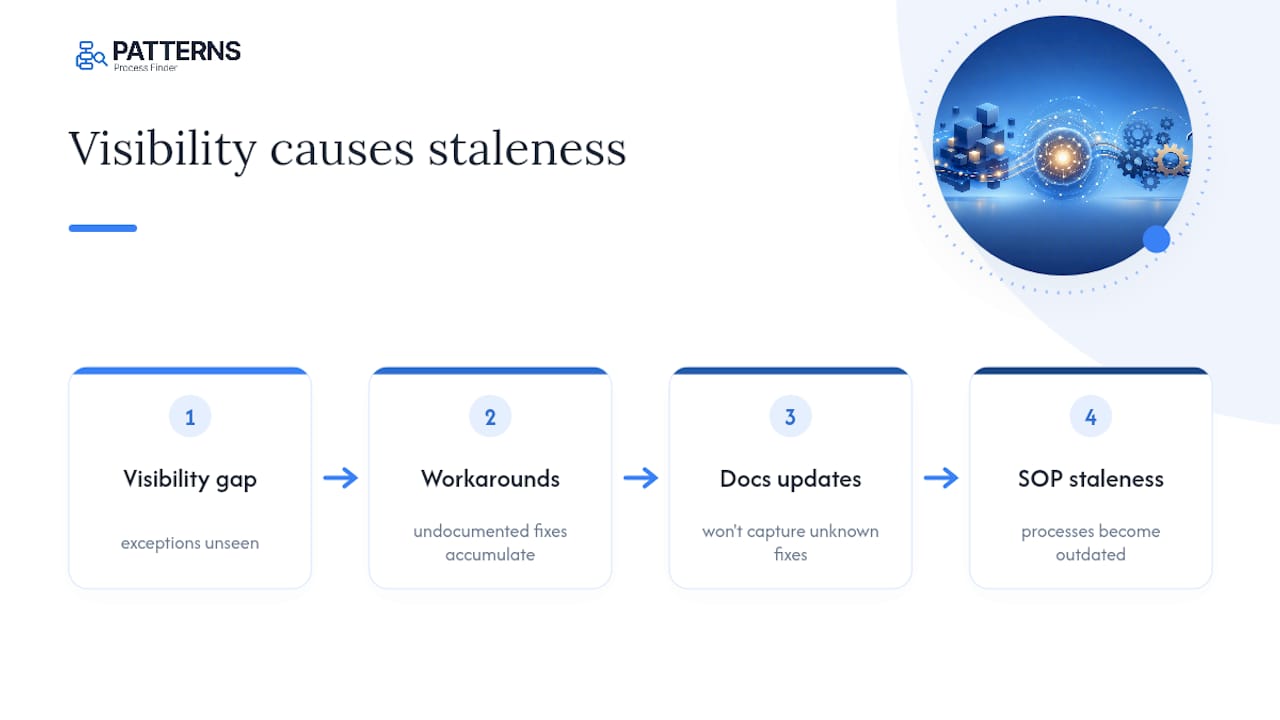
The evaluation criteria in this piece matter more than the vendor logo attached to them. Capture fidelity comes first because everything downstream, governance, integration, ROI, is worthless if the tool never sees the exception path in the first place. Teams that buy on integration features before proving capture quality tend to automate the wrong process confidently.
If you take one thing from this, run the pilot before you run the procurement process. Twelve weeks against a real process will tell you more than any vendor comparison sheet, and it will surface whether your organization’s real bottleneck is tooling or the review discipline nobody wants to admit is missing.
— Malek
Ready to pilot living SOPs? Here’s what to request
Patterns Process Finder gives operations and RPA teams something a wiki update cycle never can: SOPs that update themselves as work changes, instead of documentation that’s accurate on publish day and wrong within a quarter. That’s the concrete gap this article has walked through, and it’s the exact gap Patterns was built to close.
Before you commit to a pilot with any vendor, ask for a capture sample from a process similar to your own, a walkthrough of the privacy safeguards applied during recording, and the specific metrics you’ll track against your baseline. Patterns’ process mining tool offers a free sign-up path if you want to see capture fidelity firsthand before scoping a full pilot. Most teams move from initial demo to a scoped pilot within two to three weeks, and procurement conversations tend to move faster once you can point to a specific exception rate you’re trying to fix. Request a demo, bring one high-exception process to it, and see what the capture actually surfaces.
Sources
- SOP sprawl and manufacturing risk — author-it
- Hidden risk in document control: SOPs expire faster than you think — QAtrial
- How to keep SOP documentation updated (2026 guide) — Trainual
FAQ
What is an automated documentation tool?
It’s software that captures real user workflows across desktop and browser applications through task mining and process mining, then generates continuously updated SOPs and process maps from that captured behaviour, rather than static documents written from memory.
How does this differ from tools that write user manuals?
Manual-generation tools document a software interface for end users. An automated documentation tool documents an internal operational process, including hidden exceptions, and feeds that documentation into RPA and automation pipelines.
How long does a pilot typically take?
A realistic pilot runs 8 to 12 weeks, covering process selection, capture setup, SOP validation with subject matter experts, integration into an automation pipeline, and outcome measurement against a defined baseline.
What metrics prove the tool is working?
Track exception rate, average remediation time for broken automations, SOP review cycle time, and retraining workload. A drop across these after implementation signals the living SOP approach is closing the gap that caused failures.
What causes most SOP-related audit findings?
Document lifecycle gaps, meaning SOPs that fall out of sync with actual practice, generate roughly 30 to 35 percent of findings in some audits, which is why controlled publishing and version control matter as much as capture accuracy.
Does Patterns Process Finder handle compliance and audit requirements?
Patterns Process Finder is built around version control, audit trails, and controlled publishing workflows, the same governance components auditors and compliance teams expect from a regulated documentation system.