
SOC 2 logging requirements: your Type II audit checklist
SOC 2 logging requirements demand a tamper-resistant, centralised audit trail that captures successful and failed authentication, privilege and role changes, configuration modifications, security-relevant application errors, and administrative or API actions — plus documented continuous monitoring with alert triage and resolution records covering the full Type II observation window. Auditors do not just verify that logs exist; they sample the alert-to-resolution chain to confirm controls operated consistently over time.
The four Common Criteria where logging is most heavily tested are CC6.1 (logical access), CC7.2 (continuous monitoring), CC7.3 (incident response), and CC8.1 (change management). Every event you capture should map to at least one of these.
Immediate artefacts auditors request during fieldwork:
- Sample raw logs exported for a date range within the observation period
- Alert tickets with timestamps, investigator notes, and documented resolution
- Written retention policy and lifecycle configuration screenshots
- Access-review records for the logging platform itself
- Architecture diagram showing centralised ingestion and immutable storage
- NTP configuration evidence confirming clock synchronisation across sources
- Change-management tickets for any modifications to logging configuration
Table of Contents
- Which SOC 2 Common Criteria map to logging?
- What exactly should you log? A concrete event checklist
- How to satisfy CC7.2 with continuous monitoring and SIEM alerting
- How to document incident triage so auditors accept it as evidence
- Protecting log integrity and restricting access to the logging platform
- Retention policy and lifecycle tiers for a Type II observation period
- What to hand auditors: the evidence package checklist
- Phased implementation plan and cost drivers
- How Patterns Process Finder closes SOC 2 logging gaps
- Key takeaways
- What operations teams consistently get wrong about SOC 2 logging
- Patterns Process Finder helps you find what your log inventory is missing
- Useful sources and references
- FAQ
Which SOC 2 Common Criteria map to logging?
| Common Criterion | What it requires from logging | Typical auditor artefact |
|---|---|---|
| CC6.1 — Logical access | Successful/failed auth, MFA events, session creation/expiry, role assignments, actor context | IdP/IAM log exports, access-review records |
| CC7.2 — System monitoring | Continuous ingestion into a SIEM or equivalent, automated alerting, evidence of regular alert review | SIEM alert definitions, alert delivery records, review logs |
| CC7.3 — Incident response | Documented investigation and remediation for each sampled alert | Tickets with chronology, evidence attachments, closure timestamps |
| CC8.1 — Change management | Configuration, schema, deployment, and permission changes linked to approved change tickets | Change log exports, approval workflow records |
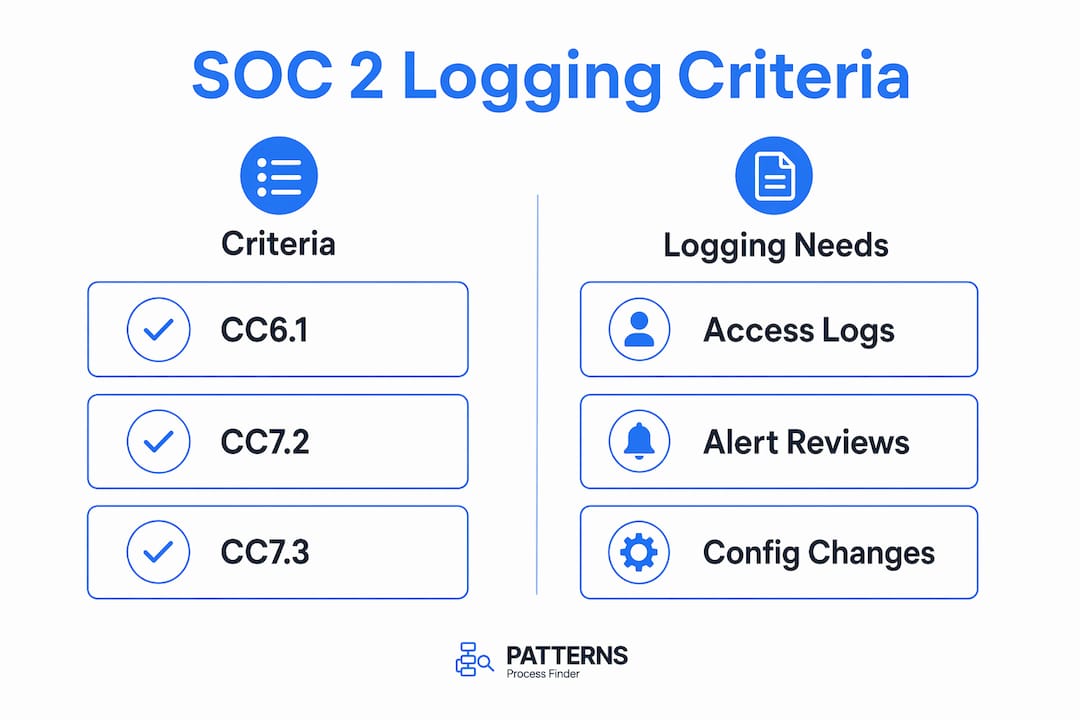
CC7.2 is where most teams fall short. Auditors require evidence that alerts are reviewed, investigated, and remediated in a repeatable, documented workflow — not just that a SIEM is running.
What exactly should you log? A concrete event checklist
Eight mandatory log source categories form the baseline for any SaaS environment:
- Authentication and IdP: successful and failed logins, MFA challenges, session creation and expiry, account lockouts, password resets
- Cloud infrastructure audit logs: AWS CloudTrail, Azure Activity Logs, or GCP Cloud Audit Logs — all API calls, resource provisioning, and IAM changes
- Database access: privileged queries, schema changes, access by service accounts, export events
- Privileged admin actions:
sudousage, console access, break-glass account activity - Network, WAF, and firewall: accept/deny decisions, high-severity WAF matches, VPC flow logs
- CI/CD pipeline: deployment events, pipeline configuration changes, secret access
- Application and API: permission-denied errors, rate-limit triggers, MFA enrolment changes, forced logouts
- Third-party integration admin actions: any admin-level action taken inside connected SaaS tools
Every log entry must include: UTC timestamp, actor identity (user or service ID), action taken, source IP or hostname, resource affected, outcome (success or failure), and a request or trace ID. Add tenant name and application name as contextual metadata wherever possible.
Use structured JSON for all application logs. Schema versioning makes exports auditable and prevents silent format drift that breaks SIEM parsers mid-observation period.

Pro Tip: Verify NTP synchronisation on every log source before the observation period begins. Auditors test timestamp drift across systems; excessive drift impedes event correlation and results in findings.
How to satisfy CC7.2 with continuous monitoring and SIEM alerting
A SIEM or equivalent streaming monitoring platform, combined with documented alerting and review processes, is the practical requirement for CC7.2. Log volume alone does not satisfy it.
Alert rules to implement as a minimum:
- Multiple failed authentications followed by a successful login (brute-force pattern)
- Privilege escalation outside approved change windows
- Unusual API usage patterns or sudden spikes in data-access events
- Impossible travel (login from two geographically distant locations within minutes)
- Sudden drop in log ingestion volume from any source (pipeline gap)
- High-severity WAF or firewall matches
Silent logging failures — where a host stops sending logs without triggering an alert — are treated as a CC7.2 control failure. Implement heartbeat monitoring on the logging pipeline and alert when a source goes quiet for more than a defined threshold.
Operational evidence auditors sample for each alert: the alert definition, the delivery record (timestamp and assignee), the linked investigation ticket, and a documented resolution or accepted-risk exception.
How to document incident triage so auditors accept it as evidence
Logs that nobody monitors are essentially useless as audit evidence. Auditors sample the alert-to-resolution trail, so each ticket must stand on its own.
Required fields in every investigation ticket:
- Alert ID and rule name that triggered it
- First-observed timestamp
- Assigned analyst and assignment timestamp
- Investigation chronology (step-by-step notes)
- Evidence attachments (log exports, query results, screenshots)
- Mitigation or remediation steps taken
- Owner and due date for any follow-up remediation
- Closure timestamp
- Post-incident lessons or accepted-risk rationale
Keep a searchable archive of closed investigations that links back to the originating alert and to any change-management ticket raised as a result. Auditors will request a sample and expect to trace the full chain in under five minutes.
Protecting log integrity and restricting access to the logging platform
The logging platform itself must have access controls and periodic reviews. Auditors cite CC6 deficiencies when logging administrators are not themselves audited.
Technical controls:
- Append-only or WORM storage (e.g., AWS S3 Object Lock) to make deletion or alteration impossible
- Cryptographic hashing or hash-chaining on log batches, with hashes stored separately
- Dedicated logging account or project isolated from production workloads
- Monitoring for configuration changes to retention policies or access controls
Process controls:
- Quarterly access reviews for the logging platform, with named reviewers and approval records
- Explicit approval workflow for any retention policy change
- Logging of all administrative access to the log store itself
Artefacts to produce during fieldwork: access-review records showing names, roles, review date, and approver signature; retention policy change tickets; and admin access logs for the logging platform.
Retention policy and lifecycle tiers for a Type II observation period
Retention must cover the full Type II observation window plus a buffer. A minimum of 12 months is standard auditor expectation for security-relevant logs; many teams target 15 months to avoid gaps when audits run late.
Recommended tiered approach:
- Hot (0–90 days): fully indexed and searchable for operational queries and active investigations
- Warm (90 days to 12 months): accessible within minutes for incident investigation and auditor requests
- Cold/archival (beyond 12 months): immutable storage for evidentiary needs, with documented retrieval procedures
Per-category minimums: authentication logs, authorisation-change logs, configuration-change logs, and security-incident logs should be retained for the longest period auditors expect. Application access and network flow logs can have shorter retention periods. Debug and verbose performance logs rarely factor into audit evidence and can have the shortest retention.
Common pitfall: default bucket lifecycle rules that delete logs after 30 days. Audit your lifecycle configuration before the observation period starts and document the policy in writing.
What to hand auditors: the evidence package checklist
Prepare a repeatable evidence package so auditor requests become a retrieval exercise, not a scramble.
| Artefact | Where it lives | Owner |
|---|---|---|
| Log source inventory spreadsheet | Compliance wiki or GRC tool | Security operations lead |
| SIEM export for sampled date ranges | SIEM platform or cold archive | Security engineer |
| Architecture diagram (ingestion + immutable storage) | Confluence or equivalent | Infrastructure lead |
| Retention policy document | Policy management system | Compliance owner |
| Alert definitions and delivery records | SIEM / ticketing system | Security operations lead |
| Investigation ticket archive | Ticketing system | Security analyst |
| Access-review records for logging platform | GRC tool or spreadsheet | Compliance owner |
| NTP configuration evidence | Infrastructure runbook | Infrastructure lead |
| Hash verification outputs | Logging platform or archive | Security engineer |
| Change tickets for logging configuration updates | Change management system | Change manager |
Organise artefacts into folders mapped to each CC control. Auditors appreciate a cover sheet that lists each control, the artefact that satisfies it, and the file path.
Phased implementation plan and cost drivers
Phase 1 (weeks 0–4): scope and source inventory. List every system that generates security-relevant events. Assign an owner to each source. Confirm NTP is active on all hosts.
Phase 2 (weeks 4–8): centralise critical logs. Enable cloud provider audit logging across all regions and services. Ingest IdP, database, and application logs into a SIEM or log aggregation platform. Verify ingestion daily.
Phase 3 (weeks 8–12): alerting and triage workflows. Implement the alert rules listed above. Build the investigation ticket template. Run a tabletop exercise using a simulated alert to validate the triage chain.
Phase 4 (weeks 12–20): harden integrity and retention. Enable WORM storage. Configure lifecycle tiers. Document the retention policy. Schedule the first quarterly access review.
Ongoing: quarterly access reviews, monthly evidence export rehearsals, and heartbeat monitoring for the logging pipeline.
Primary cost drivers: log storage volume and retention tier (the largest variable), SIEM subscription or managed detection service, engineering effort to instrument custom application events, and incident-response tooling or analyst staffing.
For automation teams, structured JSON logging from day one eliminates the reformatting cost later. Reusing process-discovery outputs to identify high-value log sources cuts scoping time significantly.
How Patterns Process Finder closes SOC 2 logging gaps
Operations teams frequently discover during audit fieldwork that their assumed log source inventory does not match reality. Patterns Process Finder captures real employee workflows as they actually execute, not as they are documented in SOPs, which surfaces the hidden subprocess branches and exception paths that generate critical auth and configuration events auditors sample.
Practical applications for SOC 2 readiness:
- Identify overlooked manual steps that touch privileged systems and must feed the SIEM
- Map which applications and integrations generate admin or API actions requiring logging
- Generate a reality-based log source inventory and owner map directly from observed workflows
- Detect automation gaps where events are not being captured because the process was assumed to be fully automated
Patterns’ security and data privacy controls mean that workflow capture itself operates within enterprise security protocols, so the discovery process does not introduce new compliance risk. Outputs from Patterns can feed directly into the evidence package: the source inventory spreadsheet, the list of systems missed in the original scope, and snapshots of real-time activity that confirm which processes are in scope for the observation period.
Key takeaways
SOC 2 Type II audit readiness requires a centralised, tamper-resistant logging architecture mapped to CC6.1, CC7.2, CC7.3, and CC8.1, with documented alert triage and at least 12 months of retention for security-critical logs.
| Point | Details |
|---|---|
| Map every log source to a CC control | Authentication, config, and privilege-change logs must trace directly to CC6.1, CC7.2, or CC8.1. |
| Monitor the pipeline, not just the logs | Implement heartbeat alerts so silent ingestion failures are caught before auditors find the gap. |
| Retain security logs for at least 12 months | Cover the full Type II observation window plus buffer; document lifecycle tiers in writing. |
| Treat triage tickets as primary evidence | Each sampled alert needs a linked ticket with timestamps, investigation notes, and a closure record. |
| Patterns Process Finder surfaces missing log sources | Process discovery reveals overlooked workflows and generates the source inventory auditors expect. |
What operations teams consistently get wrong about SOC 2 logging
The most common failures are not missing event types. They are process and evidence gaps: access reviews that were never scheduled, logging pipelines that silently stopped ingesting from one source three months into the observation period, and retention policies that existed on paper but were never enforced in the lifecycle configuration.
Teams spend significant effort tuning SIEM rules and then hand auditors a folder of raw logs with no ticket trail. Auditors do not reward log volume. They reward demonstrable, repeatable operation: an alert fired, someone investigated it, the ticket shows what they found, and the finding was resolved or formally accepted.
The practical priority order: first, make the logging pipeline itself observable with heartbeat monitoring. Second, scope critical customer-impacting systems before anything else. Third, automate evidence exports so the quarterly rehearsal takes hours, not days. Audits should feel like a scheduled retrieval exercise, not a reconstruction project.
Patterns Process Finder helps you find what your log inventory is missing
The gap between “we think we log everything” and “we can prove it to an auditor” is almost always a scoping problem, not a technology problem. Patterns Process Finder captures how work actually happens across your organisation, generating a source inventory and exception map that shows which systems, integrations, and manual steps are generating security-relevant events outside your current SIEM coverage.
For operations and automation teams preparing for a Type II audit, that means fewer surprises during fieldwork and a faster path to assembling the evidence package auditors expect. Patterns’ process-discovery tool is available to evaluate now. Request a demo or sign up to see which log sources your current scope is missing.
Useful sources and references
Key primary references that support this guide:
- SOC 2 Audit Log Requirements: Complete Checklist for SaaS | AuditKit — Detailed mapping of CC6.1, CC7.2, CC7.3, and CC8.1 to specific event categories; useful for validating your event checklist and NTP requirements.
- SOC 2 Logging and Monitoring Controls: Audit Readiness | soc2auditors.org — Explains how log sources map to Trust Services Criteria and why centralised, tamper-proof architecture is a prerequisite for audit evidence.
- SOC 2 Logging Pipelines: Key Requirements, Steps, and Templates | Konfirmity — Covers retention policy alignment with PCI DSS, ISO 27001, HIPAA, and SOX; useful for organisations with overlapping regulatory obligations.
- SOC 2 Logging and Monitoring Best Practices | Konfirmity — Reinforces that logs are primary objective evidence for Type II reports and that monitoring process matters more than raw volume.
- Log Management and Monitoring Policy for SaaS | NoCodeListed / ComplyKit — Covers heartbeat monitoring, mandatory log source categories, and pipeline health checks; directly supports CC7.2 implementation.
- How to Meet SOC 2 Audit Logging Requirements | Safeguard.sh — Practical guidance on access reviews for the logging platform, WORM storage configuration, and retention lifecycle pitfalls.
- Log Management and Monitoring Policy Guidance | Daydream / ComplyKit — Focuses on the alert-triage-resolution chain as the core CC7.2 evidence requirement; useful for building the investigation ticket template.
FAQ
What events must you log for SOC 2 compliance?
SOC 2 requires logging of successful and failed authentication, MFA events, privilege and role changes, configuration modifications, sensitive data access, admin and API actions, and security-relevant application errors. These events map to CC6.1, CC7.2, CC7.3, and CC8.1.
How long must you retain logs for a SOC 2 Type II audit?
Security-critical logs should be retained for at least 12 months to cover the full Type II observation period; many organisations target 15 months as a buffer to prevent gaps if the audit is delayed. Document the retention policy in writing and enforce it through lifecycle configuration.
Does SOC 2 require a SIEM?
A SIEM is not explicitly mandated, but CC7.2 requires continuous monitoring with documented alerting and triage — which is impractical without centralised log aggregation for any environment beyond a handful of systems.
What do auditors actually sample during a Type II audit?
Auditors typically request a sample of alerts from the observation period and trace each one to a linked investigation ticket with timestamps, analyst notes, evidence attachments, and a documented resolution or accepted-risk exception.
How can Patterns Process Finder support SOC 2 logging readiness?
Patterns Process Finder captures real employee workflows to surface overlooked systems and manual steps that generate security-relevant events, helping teams build an accurate log source inventory before the observation period begins.