
Best work instruction software for enterprise teams
TL;DR:
- Automated discovery platforms generate living SOPs from real user behavior, reducing documentation failures. Focusing on high-risk processes and continuous metrics improves automation success and operator onboarding. Patterns Process Finder automates this discovery, ensuring secure, up-to-date, and accurate process documentation.
Discovery-first, automated documentation platforms are the right choice for enterprise operations teams evaluating work instruction software. Manual SOP projects routinely miss the micro-tasks and exception paths that cause automation pipelines to fail. Platforms that capture real workflows through passive telemetry and generate living SOPs from actual execution data reduce that failure risk at the source.
The short version:
- Choose platforms that discover workflows automatically, not tools that ask SMEs to write from memory.
- Require living SOPs with version control, not static PDFs that decay within months.
- Pilot on your highest-risk automation candidate first, baseline your metrics before go-live, and treat poor documentation as a signal to fix the process before you automate it.
Table of Contents
- Why does manual documentation fail enterprise teams?
- What features must enterprise work instruction software include?
- How should you evaluate and buy work instruction software?
- How do you measure ROI from work instruction software?
- How does Patterns Process Finder meet these requirements?
- Key takeaways
- The trade-offs most teams underestimate
- What Patterns Process Finder can show you in your first pilot
- Useful sources for vendor due diligence
- FAQ
Why does manual documentation fail enterprise teams?
The core failure is what researchers call the documentation fallacy: documented processes are often not the processes employees actually follow. Workshop-based mapping sessions capture the “happy path” that participants remember and feel comfortable describing. They routinely miss copy-paste workarounds, multi-application hand-offs, and client-specific exception rules that only surface during live execution.
Invisible micro-tasks and shadow processes are the specific failure mode. These are the small, habitual steps operators perform between documented steps, and they are precisely where automation bots break. When an AI agent runs against documentation that omits these steps, it does not fail gracefully. It scales the broken process.
Static documentation compounds the problem. Without a defined owner and an update cadence, SOPs become obsolete within months of publication. Teams end up automating a process that no longer matches how work is actually done.
Pro Tip: Start discovery on the process with the highest automation failure rate, not the easiest one to document. That is where the invisible steps are hiding.
| Documentation method | What it captures | What it misses |
|---|---|---|
| Workshop-based mapping | Stated happy path | Exception branches, micro-tasks |
| Event-log process mining | System-recorded events | Browser actions, copy-paste, multi-app steps |
| Passive telemetry discovery | All user actions across apps | Nothing at the desktop level |
What features must enterprise work instruction software include?
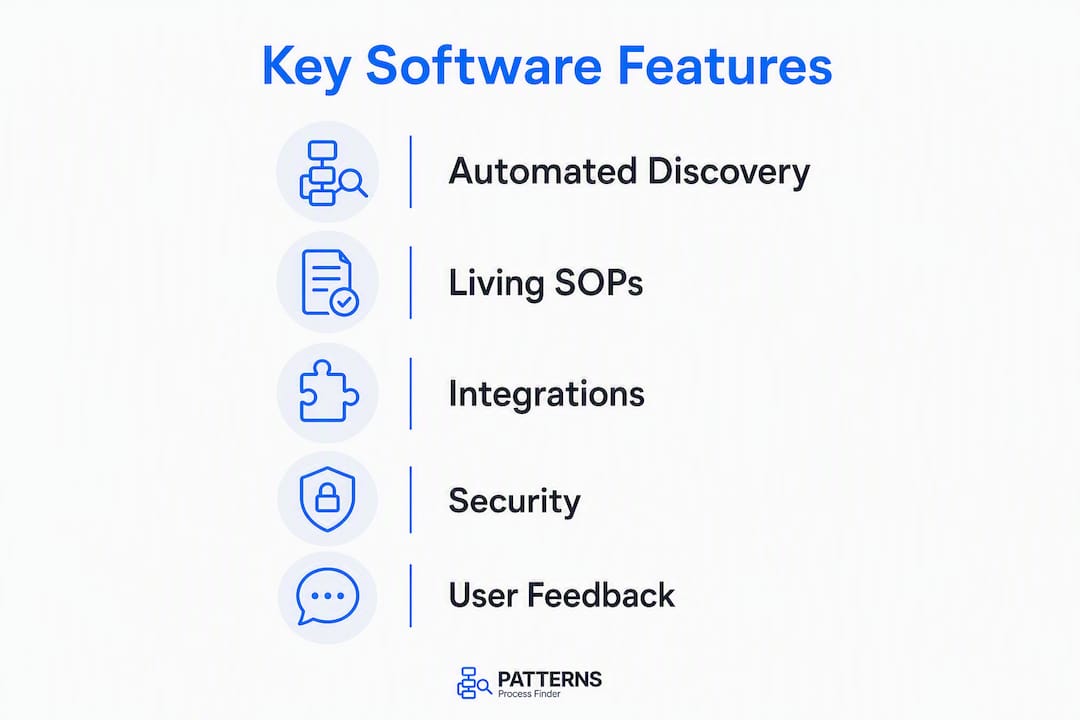
Five capability groups separate enterprise-grade platforms from tools that merely host PDFs.
1. Automated discovery The platform must capture real user behaviour across desktop and browser applications without requiring manual input. Passive telemetry surfaces copy-paste actions, multi-app workarounds, and timing patterns that event-log mining misses entirely. This is the foundation everything else depends on.
2. Living SOPs with version control Documentation must update as processes change. Enterprise-grade platforms include version control, audit trails, and role-based access so every operator sees the current version and every change is traceable for compliance.

3. Integrations MES, ERP, and RPA platform integrations are non-negotiable for mid-to-large deployments. Documentation that cannot connect to execution systems stays theoretical.
4. Verification and monitoring Active verification confirms steps were physically completed, not just viewed. Continuous monitoring flags when live execution diverges from the documented process.
5. Operator feedback loops Platforms that let operators suggest improvements inside the documentation see higher engagement than top-down approaches. This is also your best early-warning system for process drift.
Accurate process documentation is a prerequisite for safe automation. When AI agents run against poor documentation, they scale broken processes rather than correct ones. Discovery-first platforms address this at the source by generating SOPs from observed behaviour rather than recalled procedure.
Security and data privacy: For North American enterprises, require SOC 2 Type II certification, role-based access controls, data residency options within Canada or the United States, and audit logs that satisfy internal compliance requirements. Confirm the vendor’s data retention policy and who owns the captured workflow data contractually.
How should you evaluate and buy work instruction software?
The recommended procurement sequence is: controlled pilot, then phased rollout, then governance at scale. Skipping the pilot is the single most common mistake in enterprise deployments.
Vendor questions to ask before signing:
- How does your platform capture data — agent-based, browser extension, or API? What actions does it miss?
- What integrations are production-ready versus in beta?
- What is your SLA for uptime and support response during rollout?
- Who owns the captured workflow data, and what happens to it if we cancel?
- How do you handle data residency for Canadian or US-based operations?
Red flags that should pause procurement: no audit trail, no defined data ownership clause, integrations that require custom development, and pricing that scales per-document rather than per-user or per-process.
| Deployment phase | Typical duration | Key milestone |
|---|---|---|
| Pilot (multiple processes) | a few weeks | Baseline metrics captured, first SOP generated |
| Integration and validation | several weeks | MES/ERP connections live, SME sign-off complete |
| Phased rollout | a few months | Department-by-department adoption, governance defined |
| Full scale and governance | Ongoing | Process ownership assigned, review cadence active |
Cost considerations vary by organisation size and use-case. Licensing typically follows a per-user or per-process model. Budget separately for integration effort, change management, and initial training. Enterprise deployments commonly require dedicated IT involvement for SSO, network permissions, and data residency configuration.
Pro Tip: Require a sandbox environment during the pilot. Vendors who cannot provide one are signalling that their onboarding process is not mature enough for enterprise deployment.
How do you measure ROI from work instruction software?
The primary ROI levers are reduced automation failure, lower defect and rework rates, faster operator onboarding, and time saved on documentation itself. Each is measurable with a defined baseline.
- Automation success rate: percentage of RPA or AI agent runs that complete without human intervention. Measure before and after SOP accuracy improves.
- Mean time to document: hours required to produce a verified SOP for a new process. Discovery-first platforms compress this significantly by generating a baseline draft that SMEs validate rather than write from scratch.
- Rework per shift: defects or corrections traced to process deviation. Tie this to specific SOPs to identify which documentation gaps are costing the most.
- Time-to-value for new operators: days from hire to independent task completion. Accurate, visual SOPs with verification steps consistently reduce this.
Operator feedback loops also drive measurable engagement gains. Teams using platforms where operators can flag issues inside the documentation tend to catch process drift earlier, before it becomes a defect or an automation failure.
Collect baseline data for all four metrics during the pilot phase. Review monthly for the first quarter, then quarterly once the platform is at scale.
How does Patterns Process Finder meet these requirements?
Patterns Process Finder automates the discovery phase entirely. It records real user actions across desktop and browser applications, identifies subprocess branches and exception patterns, and generates living SOPs from observed behaviour rather than recalled procedure. The result is documentation that reflects how work actually happens.
| Buyer requirement | Patterns Process Finder capability |
|---|---|
| Automated discovery | Passive telemetry across desktop and browser apps |
| Living SOPs | Auto-generated, continuously updated documentation |
| Integrations | Enterprise system connectivity for RPA and analytics platforms |
| Verification and monitoring | Execution divergence detection and process analytics |
| Operator feedback | Suggestion workflows built into the SOP interface |
| Security and privacy | Enterprise-grade controls, role-based access, audit logs |
Pilot recipe:
- Scope: 1–3 high-risk automation candidates
- Duration: 2–8 weeks
- Objectives: capture baseline metrics, generate first SOP drafts, validate with SMEs
- Success metrics: automation success rate improvement, reduction in mean time to document, SME sign-off rate
Pro Tip: Involve your RPA developer and a frontline operator in the pilot from day one. The developer spots integration gaps early; the operator catches the micro-tasks the discovery layer needs to flag.
Key takeaways
Discovery-first work instruction software reduces automation failure by capturing how work actually happens, not how it is supposed to happen.
| Point | Details |
|---|---|
| Discovery before documentation | Automated telemetry captures micro-tasks and exceptions that workshop mapping misses. |
| Living SOPs prevent decay | Version control and defined ownership keep documentation accurate as processes evolve. |
| Pilot on high-risk processes | Start with your highest automation failure candidate to surface the most valuable gaps first. |
| Measure four core metrics | Track automation success rate, mean time to document, rework per shift, and time-to-value. |
| Patterns Process Finder | Automates discovery and generates living SOPs from real execution data, mapped to enterprise security requirements. |
The trade-offs most teams underestimate
Discovery-first platforms compress documentation time, but they do not eliminate the need for human judgement. The platform captures what operators do. It takes an SME to confirm whether what they do is what they should do. That validation step is where most implementations slow down, not the technology.
Governance is the other underestimated variable. Living SOPs only stay alive if someone owns them. Assign a named process owner for every documented workflow before rollout, not after. Without that accountability, even the best discovery platform produces a repository that drifts back toward obsolescence.
The most important shift in mindset is to treat poor documentation as a diagnostic, not a documentation problem. If discovery reveals that operators are using three different workarounds for the same step, the answer is not to document all three. The answer is to fix the process, then document it. Automating a broken process faster is not progress.
What Patterns Process Finder can show you in your first pilot
Patterns Process Finder’s recommended entry point is a focused pilot on one to three processes where automation has already failed or stalled. Within the first two to four weeks, the process mining tool surfaces the subprocess variations and exception patterns your current documentation does not capture, and generates a baseline SOP draft your SMEs can validate rather than write from scratch.
For the pilot, involve your operations lead, one RPA developer, and at least one frontline operator. Review pricing plans to match the deployment tier to your team size, and confirm your security and data residency requirements against the security page before your first call. Request a demo at processfinder.ai to scope the pilot with the Patterns team directly.
Useful sources for vendor due diligence
These sources support the claims in this article and give you additional context for evaluating vendors.
- The Workflow Mapping Gap | Larridin: Evidence for why passive telemetry outperforms workshop mapping. Use this to challenge vendors on what their discovery layer actually captures.
- AI Agents and the Process Documentation Fallacy | Reworked: Explains why accurate documentation is a prerequisite for safe AI agent deployment. Useful for building the internal business case.
- Work Instructions Software Selection Guide | manufacturing.toolsinfo.com: Buyer framework covering organisation-size fit and use-case ratings. Use during vendor shortlisting.
- Digital Work Instruction Software | Jidoka Technologies: Covers verification, audit trails, and integration requirements. Use to build your vendor questionnaire.
- Patterns Process Finder security page: Enterprise controls, data residency, and compliance details for North American deployments.
| Source | Best used for |
|---|---|
| Larridin / Workflow Mapping Gap | Challenging vendor discovery claims |
| Reworked / Documentation Fallacy | Internal business case for discovery-first |
| manufacturing.toolsinfo.com guide | Shortlisting by org size and use-case |
| Jidoka Technologies | Building your vendor questionnaire |
| Patterns Process Finder security page | Security and compliance due diligence |
FAQ
What is the difference between work instruction software and process documentation software?
Work instruction software delivers step-by-step guidance to operators at the point of execution. Process documentation software captures, governs, and maintains the broader process knowledge behind those instructions, including roles, rules, and version history.
Why do automated discovery platforms reduce automation failure?
Manual mapping misses the micro-tasks and exception branches that cause RPA bots and AI agents to break. Discovery platforms capture actual execution behaviour, so the resulting SOPs reflect what operators genuinely do.
How long does a typical enterprise pilot take?
Most mid-to-large deployments run a focused pilot in 2–8 weeks, covering one to three processes, before moving to phased rollout across departments.
Does Patterns Process Finder support enterprise security requirements?
Yes. Patterns Process Finder includes role-based access controls, audit logs, and enterprise-grade privacy controls. Full details are on the security page.
How do you measure the ROI of work instruction software?
Track four metrics: automation success rate, mean time to document, rework per shift, and time-to-value for new operators. Collect baselines during the pilot phase and review monthly for the first quarter.